
Architecture Overview
An overview of the Klevr Integration Hub architecture
Architecture Diagram
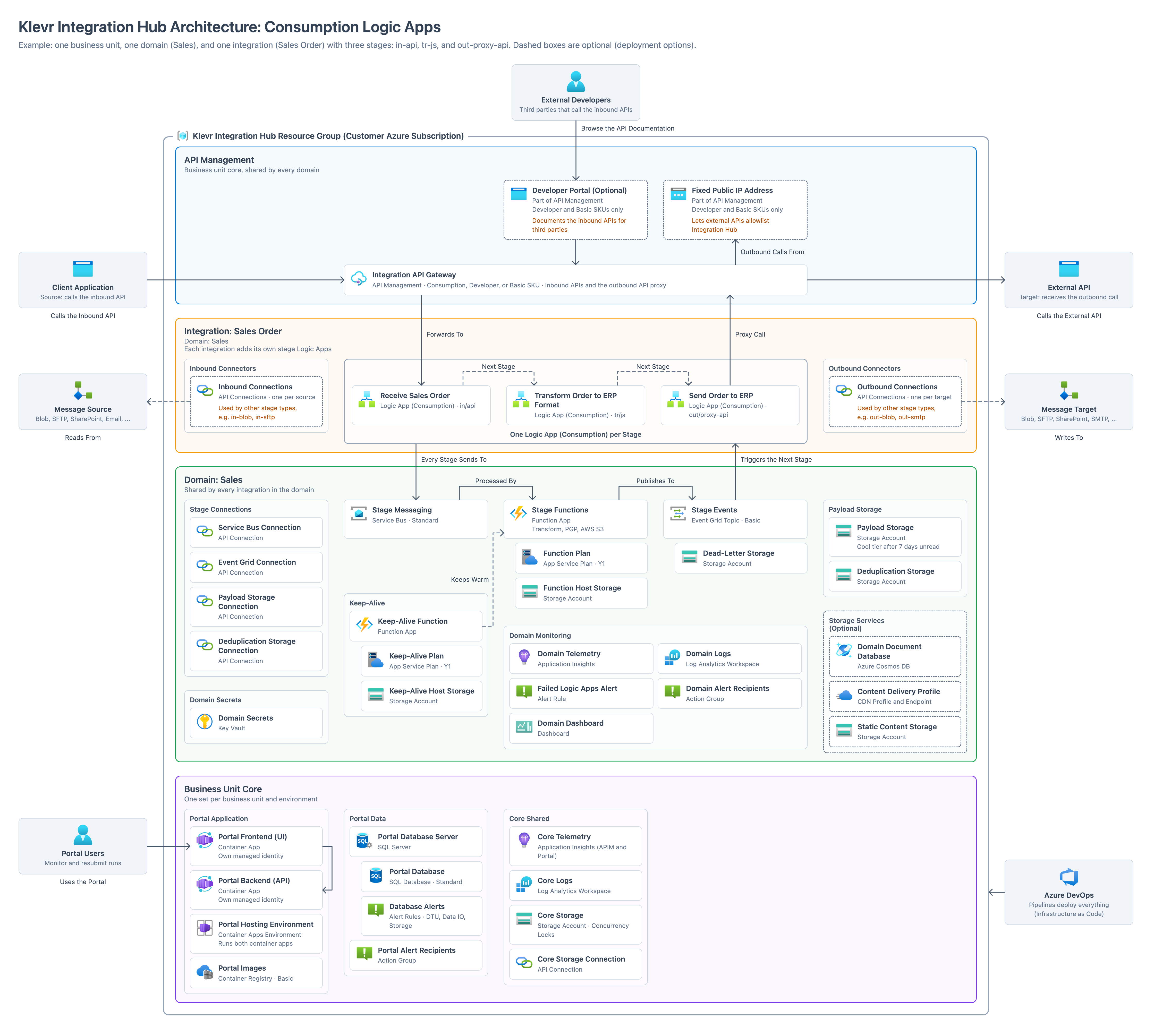
The diagram shows the Azure resources that the Integration Hub deployment pipeline creates, for one domain with one example integration. Select the Logic App mode of your deployment to see its diagram. Dashed resources are optional. Click a diagram to expand it.
How a Message Flows
- A message comes into Integration Hub. Either an external application calls an inbound API in API Management, or an inbound stage reads the message from a source, such as blob storage, SFTP, or email.
- The stage stores the payload in payload storage, and publishes a message to the domain Service Bus.
- The stage functions read the message from Service Bus, and publish it as an event to the domain Event Grid topic.
- Event Grid triggers each stage that subscribes to the event. Each of these stages does its work, and then publishes its own message (step 2).
- An outbound stage sends the message to its target. API calls go out through API Management. Other targets, such as blob storage, SFTP, or email, use a connector.
See Pub/Sub Model for more details.
Deployed Resources
The pipeline deploys resources at three levels: the business unit, each domain, and each integration. See Organisational Structure for how business units, domains, and integrations relate.
API Management
There is one API Management service for each business unit and environment. Every domain shares it.
- It publishes the inbound APIs that external applications call to send messages into Integration Hub. Each domain has its own API product.
- It applies the security options of each API, when required.
- It acts as a proxy for outbound API calls. Every outbound API stage sends its request through API Management.
- It logs API calls to Application Insights.
The API Management SKU sets whether there is a fixed outbound IP address and a Developer Portal. See Consumption vs. Standard Mode.
Integration Stages
Each integration is a chain of stages, for example inbound, transform, routing, and outbound stages. Each stage runs as a Logic App workflow.
- Consumption Logic Apps: each stage is a separate Consumption Logic App.
- Standard Logic Apps: each integration is one Logic App (Standard) site, with one workflow for each stage. The site runs on the business unit's Logic App (Standard) plan.
A stage that reads from or writes to another service, such as blob storage, SFTP, SharePoint, or SMTP, uses an API connection to that service.
Domain Resources
Each domain has its own set of the following resources. Every integration in the domain shares them, and no other domain uses them.
| Resource | What It Does |
|---|---|
| Service Bus namespace | Receives the message that each stage publishes when it completes. |
| Stage Function App | Reads the messages from Service Bus and publishes them as events to Event Grid. It also runs helper functions that stages use, such as PGP encryption and decryption, AWS S3 access, and JSON path queries. It runs on its own App Service plan (Y1), with a storage account for its host files. |
| Event Grid topic | Delivers each event to the stages that subscribe to it. Events that cannot be delivered go to the dead-letter storage account, where you can resubmit or remove them. |
| Keep-alive Function App | Calls the stage Function App every five minutes, so that it stays warm and responds without a cold-start delay. It has its own App Service plan (Y1) and storage account. |
| Payload storage account | Stores the message payload at every stage. A payload moves to the Cool tier 7 days after it was last read, and is deleted 90 days after it was last read. |
| Deduplication storage account | Makes sure that a stage does not process the same Event Grid event twice. |
| API connections | Connect the stages to the domain Service Bus, Event Grid, payload storage, and deduplication storage. |
| Key Vault | Stores the domain secrets, such as credentials for outbound APIs. API Management and the stage Function App read them. |
| Log Analytics workspace and Application Insights | Collect the logs and telemetry of the domain's stages, for reporting and error alerting. With Standard Logic Apps, a data collection rule also filters out noisy telemetry to reduce cost. |
| Alert rule and action group | The alert rule detects failed Logic App runs. The action group sends an email or SMS to the domain's alert recipients. |
| Dashboard | Shows the key metrics of the domain, such as runs, failures, and errors, so that you can manage by exception. |
Business Unit Core Resources
There is one set of these resources for each business unit and environment.
| Resource | What It Does |
|---|---|
| Core storage account and API connection | Hold the leases that stages use for lease locking. |
| Log Analytics workspace and Application Insights | Collect the logs and telemetry of API Management and the Integration Hub Portal. |
| Logic App (Standard) plan | Standard Logic Apps only. Provides the compute for the Logic App (Standard) sites of every domain. Its size and scale-out limit are set by the deployment pipeline variables. |
Optional Resources
Integration Hub Portal
The Integration Hub Portal is a web application where your users monitor integration runs, view payloads, resubmit messages, and manage access. The pipeline deploys it by default. Set the disablePortal pipeline variable to true to leave it out.
| Resource | What It Does |
|---|---|
| Container Apps environment | Hosts the portal's frontend and backend container apps. |
| Frontend and backend container apps | Run the portal user interface and its API. Each has its own managed identity, which it uses to pull its image from the container registry. |
| Container registry | Stores the portal images. |
| SQL server and database | Store the portal data. Alert rules watch the database DTU, data IO, and storage use. |
| Action group | Sends the portal database alerts to the portal alert recipients. |
NAT Gateway (Static Outbound IP)
The NAT gateway option gives Logic Apps a fixed public IP address for connections to services other than APIs, such as SFTP. The remote service can then allowlist that address. Set the DeployNgw pipeline variable to true to deploy:
- A virtual network.
- A NAT gateway.
- A static public IP address.
Only Logic App (Standard) sites can use the NAT gateway. A site joins the virtual network when one of its stages sets enableVnet to true. Consumption Logic Apps cannot use it.
Outbound API calls do not use the NAT gateway. They go out through API Management, which has its own fixed IP address on the Developer and Basic SKUs.
Storage Services
The storage services option adds data storage to a domain. Set deployStorageServices to true for the domain in domains.json to deploy:
- A Cosmos DB account, with the databases and containers that you list in
cosmosDBs. The Cosmos DB stages need it: Inbound Cosmos DB, Store Cosmos DB Query, Store Cosmos DB Upsert, and Webhook Push Alerts for Cosmos DB. - A storage account with a CDN profile and endpoint. Only the
useCDNoption of the Store Cosmos DB Upsert stage uses it.
API Management Developer Portal and Fixed IP Address
When API Management uses the Developer or Basic SKU, it also includes:
- A Developer Portal, where third-party developers can read the documentation of the inbound APIs. You do not have to use it.
- A fixed public IP address for outbound API calls, so that the target APIs can allowlist Integration Hub.
See Consumption vs. Standard Mode for how to choose the SKU.
Last updated on