
Payfurl Overview
This document outlines the architecture and data flow for the integration between Klevr Fundraising (built on Microsoft Dynamics CE), Payfurl (payment...
📘 Klevr–Payfurl Integration Architecture Documentation
Overview
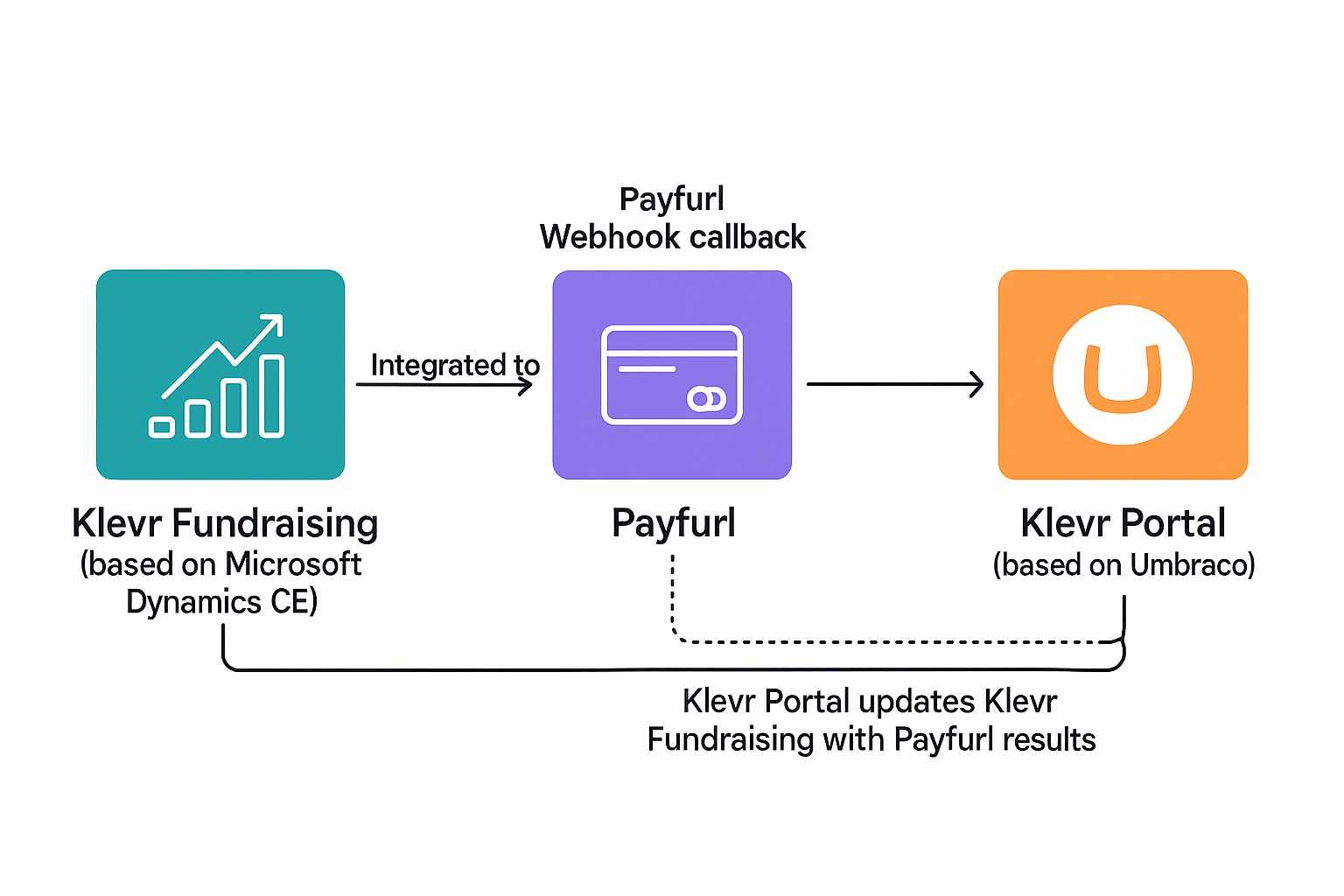
This document outlines the architecture and data flow for the integration between Klevr Fundraising (built on Microsoft Dynamics CE), Payfurl (payment gateway), and the Klevr Portal (built on Umbraco CMS). The integration facilitates seamless payment processing and status updates across systems.
🔗 Components
- Klevr Fundraising (Microsoft Dynamics CE) Manages donor and fundraising campaign data. Keeps track of payment methods stored in payfurl for contacts, processes one off and recurring payments, generate pay by link payments through Payfurl.
- PayfurlHandles payment processing. Sends webhook callbacks upon transaction completion.
- Klevr Portal (Umbraco) Receives webhook callbacks from Payfurl. Updates Klevr Fundraising with payment results.
🔄 Data Flow
- Payment Initiation A user initiates a donation or payment via Klevr Fundraising. A Payment record is created within Fundraising, specifying the provider, the payment method, the contact making the payment and the payment type. Dynamics CE sends a payment request to Payfurl with necessary metadata (e.g., transaction ID, amount, currency).
- Payment Processing Payfurl processes the payment using its internal gateway logic. Upon completion (success/failure), Payfurl triggers a webhook callback to the Klevr Portal.
- Webhook Handling The Klevr Portal receives the webhook payload from Payfurl. Payload includes transaction status, reference ID, and other metadata, and payment outcome.
- Fundraising Update The Klevr Portal uses the reference ID to locate the corresponding record in Klevr Fundraising. It updates the payment status and logs the transaction outcome. If it is a failure, and the failure is confiugred for retry and within the retry limits, the next processing date will be calculated and set on the payment record.
- Retries and Recurring Payments are processed hourly by a Power Automate Flow within Klevr Fundraising.
🔐 Security Considerations
- Webhook Authentication: Ensure Payfurl webhook requests are validated using a shared secret or signature. The authentication key configured in Payfurl must be the same key configured in the Klevr Portal settings.
- Data Integrity: The integration uses Dynamics Record IDs and Payfurl External Keys to correlate records across systems.
- Error Handling: Errors are captured on the payment record, as associated payment failure records. A payment failure is associated to a failure type based on the error code, and failure types can be configured in Dynamics to specify number of retries, and retry timing.
🛠️ Technologies Used
- Microsoft Dynamics CE: CRM and fundraising logic.
- Payfurl: Payment gateway and webhook service.
- Umbraco CMS: Web portal and webhook receiver.
📈 Benefits
- Real-time payment status updates.
- Centralized fundraising data.
- Improved donor experience through seamless integration.
Last updated on