
Processing
The Processing group of the Settings area contains all the tables associated to processing of Payments such as a list of all Payment Methods in the system...
Feature Overview
The Processing group of the Settings area contains all the tables associated to processing of Payments such as a list of all Payment Methods in the system (rather than seeing them from individual Contacts), Payment Processors and failures.
Payment Methods
Overview
The Payment Method table in Klevr Fundraising stores the details required to process payments for a donor.
Each Payment Method represents a tokenised payment instrument (for example, a credit card) that can be reused for:
- One‑off payments
- Payments made via payment links
- Scheduled and recurring payments
Where Payment Methods Are Used
Payment Methods are referenced across multiple areas of Klevr Fundraising:
- Payments A Payment may reference a specific Payment Method.
- Recurring Gifts Future payments can automatically use:The Contact’s default Payment Method, or A specified Payment Method on the schedule.
- Payment Links / Portal Payments When a payment is initiated, the system can attempt to resolve and use the Contact’s default Payment Method.
Record Location & Ownership
Payment Methods can be created and managed from both Contacts and Accounts, but they are always owned by a Contact.
Contact
- A Payment Methods subgrid is available on the Contact record.
- Payment Methods created here:Are directly associated with the Contact Can be marked as the Contact’s default Payment Method
Account
- A Payment Methods subgrid is also available on the Account record.
- When creating a Payment Method from an Account:The Contact field is mandatory
Setting Up a Payment Method
A Payment Method is first created and configured using standard fields on the Payment Method record. This setup defines how the payment will be processed before any card details are captured.
Steps to Set Up a Payment Method
Navigate to the relevant Contact or Account.
Open the Payment Methods subgrid.
Select New Payment Method.
Configure the core fields:
- Contact (required)
- Account (optional)
- Payment Method Type (for example, Credit Card)
- Payment Processor (for example, Stripe)
- Payment Processor Method (for example, Credit Card)
Mark the Payment Method as Default if it should be used automatically for future payments.
Save the record.
Select 'Add Payment Details' button in the ribbon.
Add the card details in the gateway and press save.
You should now see all the card details corectly added into the Payment Method.
Capturing Card Details (for cards without a CVV)
Please see "How To Guide: Capture Card Information Without a CVV Code"
Payment Method Fields
Payment Method Number System‑generated unique identifier for the Payment Method record.
Contact (Required) The individual who owns the Payment Method. Used by the system to resolve default Payment Methods during payment processing.
Account (Optional) Used when the donor relationship is primarily managed at an organisational level. Does not replace the requirement for a Contact.
Default Indicates whether this is the default Payment Method for the Contact. Only one Payment Method per Contact should be marked as default.
Payment Method Type High‑level classification (Credit or Debit). Influences how the payment is processed by the payment provider.
Payment Processor The external provider responsible for processing payments (for example, Stripe).
Payment Processor Method The specific configuration within the payment processor that defines how payments are handled.
Processor‑Managed (Read‑Only) Fields
These fields are populated by the payment processor integration and are not manually edited.
- External Type
- External Reference
- Card Number Summary (masked, for example last four digits)
- Card Holder
- Brand
- Expiry Month / Expiry Year
- 3D Secure Supported
- Card Number Token
How Payment Methods Are Used During Payment Processing
One‑Off Payments
- If a Payment specifies a Payment Method, that method is used.
- If no Payment Method is specified, the system attempts to use the Contact’s default Payment Method.
Payment Retries
- If the Payment has a Payment Method populated, that method is reused.
- If it is cleared, the Contact’s default Payment Method is resolved instead.
Recurring Payments
- Use Default Payment Method = Yes The Contact’s default Payment Method is used.
- Use Default Payment Method = No The specified Payment Method on the schedule is used.
- If no valid Payment Method can be resolved, the Payment is created in an error state.
Payment Processors
The Payment Processor record is used to define and configure payment gateways, such as Stripe. It includes details like the gateway type and configuration settings, which are necessary for connecting to the payment gateway. This record is referenced by the 'Payment Method' record to ensure secure processing of credit or debit card transactions.
Payment Failure
Payment Failures track various payment transactions and includes the following details:
- Payment: The amount of the transaction.
- Payment Processing Status: The current status of the payment
- Processing Time: The date when the transaction was processed.
- Gateway Interface: The payment gateway used (e.g., Stripe).
- Details: Additional information about the transaction (e.g., "Order Declined", "Your card was declined").
This helps in monitoring and managing payment transactions by providing detailed information on each transaction's status and any issues encountered.
- If there is a failure a 'Payment Failure' record gets generated. This can be seen on the Related tab of the Payment record.
- There is no notification system built in to work with Failures due to how each organisation works differently with notifications. This should be handled by the Delivery team.
Payment Processing Status
The 'Payment Processing Statuses' table tracks the status of various payment transactions. It includes details such as:
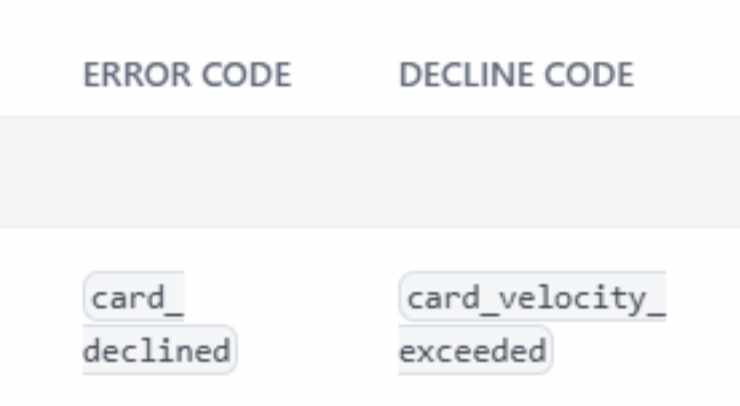
- Code: A unique identifier for each status (e.g.,
auth_declined,card_expired).- Note: We concatenate the 'error code' and 'decline code'
- Payment Processor: The service used to process the payment (e.g., Stripe).
- Error Message: Describes any issues encountered during the payment process.
- Retry Count: The number of attempts made to process the payment after an initial failure.
- Retry After Minutes: The time interval before retrying the payment processing.
- Created At: The date and time when the status was recorded.
This table helps in monitoring and managing payment transactions by providing detailed information on any errors and retry attempts.
- When a Payment fails, the 'Payment Processing Status' record for the given error is evaluated and the 'Set Recurring Gift Status' is noted.
- When a Payment fails the 'Status Reason' of the 'Recurring Gift' record is updated to the same value on 'Set Recurring Gift Status'.
- For example: Specific errors like Hard Declined can be configured to "Paused" or "Cancelled" on the 'Recurring Gift' record.
- For each unique Status that can be received from the Payment Gateway a 'Payment Processing Status' needs to be created and configured. This will then set the rules to what happens when the payment gateway gives a response.
- For example Stripe code "card_declined" may want a retry of 5 times, and then set the 'Recurring Gift' Status to Paused after those attempts.
- The delivery team needs to work with the customer on what Payment Statuses come from their gateway and what the customer would like for each one
- For Stripe, the Declined payment codes can be found at https://docs.stripe.com/testing?testing-method=payment-methods#declined-payments
Payment Processor Method
The Payment Processor Method record is used to manage different types of payment methods, such as credit cards or debit cards. This record supports the 'Payment Method' record by providing specific details about each payment method.
Financial Payout Transactions
For more information on Payouts and their associated Payout Transactions please see Payouts.
Last updated on