
Portal Client Side API
You can now configure your own API endpoints for use in custom templates and javascript snippets on portal pages.
Feature Overview
You can now configure your own API endpoints for use in custom templates and javascript snippets on portal pages. The API consists of 3 types: Queries, Records and CE Custom API's. We will explore configuring and using each of these below.
There is a new top level content section called API, and the root endpoint for the api is <your portal url>/api. API's work in conjunction with table permissions, therefore depending on the logged in user (or anonymous) the values accessible through the API is limited to their security access.
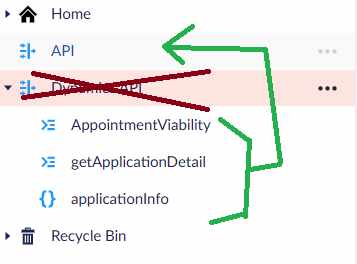
Only use the API folder for your definitions, do not create a new top level API folder, as this is not recognised by the API processor. It will only process API definitions under the "API" folder:
Queries
Queries are used to expose a list of records. They are powered by FetchXml, and therefore can contain specific filters and linked entities. You also have to specify all of the attributes you wish to expose. The table permissions will be meshed into your query to limit the resultset based on the defined security as well. You can also make use of slugs in the query filters, like @self to get to the contact. Another useful use of slugs is to use querystring slugs. To do this you can give it any name, for instance @startdate. This will then require you to add a querystring parameter called startdate to the url with a value you wish to inject into the query.
Example: Find contacts born after @startdate:
<fetch><entity name="contact"><attribute name="fullname" /><filter type="and"><condition attribute="birthdate" operator="ge" value="@startdate" /></filter></entity></fetch>If you named the page Contacts, then you can access the list of contacts via an endpoint like this: /api/contacts?startdate=1960-01-01
You can have multiple queries on the same entity, as long as each page name is unique (umbraco will add a number to the end if you use the same name again). This way you can have specific queries for specific purposes, or even for different logged in roles. See the section on page protection for more info.
Entities
This endpoint allows you to work with a specific record. You provide the table schema name, you can select if you want to expose the metadata (e.g. field length, picklist options) or not, and then you specify Read Only fields and Writeable fields. You can also specify server side updated Values (see below for more info).
If metadata is enabled, then browsing to the page with no parameters will give you the metadata, e.g. /api/contact
Read only fields will be returned when you do a get to the endpoint url, with an id=<record guid> querystring parameter, e.g. /api/contact?id=b923ba68-c255-ee11-be6f-000d3a7946f6
Security will be applied as well, so if the user does not have access to this record, they will get an error.
Writeable fields will be validated when you do a POST to this endpoint. To do a create, you post to the endpoint without an id, e.g. /api/contact and to update a record, you do a post to the endpoint with an id querystring, same as reading the record. Field formats are posted in the same format as what they are returned when they are read. Fields that are being updated are validated against the list of writeable fields, and if a mismatch is found, and error is returned. Server side Updated Values are added before the record is committed to Dynamics. The portalcreatedby, portalmodifiedby portalmodifiedon fields are automatically always updated, but you can add any additional fields or flags to this list, and these fields do not have to be in the list of writeable fields either. Only the record guid is returned when a create or update is successful. You can request a read operation to retrieve the updated record.
requesting a DELETE method on a record endpoint will delete the record if the user has delete permissions.
Please see CSRF tokens below for more info on submitting requests.
CE Custom Actions
You can define a CE Custom API endpoint too. you specify the custom action's schema name and specify the access the user needs to the target record if the aciton is a bound action. For instance if you want to trigger a send email action, then you can specify that the user only needs read access to the email to be able to send it, or you can specify they need Update access to the record in order to send it.
For unbound actions there is no security validation. Use with caution, and ensure you have at least page level security defined to limit access by logged in member roles.
Based on the action configuration, you need to submit a JSON payload that matches the parameters expected. As a result a JSON payload wil match the configuration of the responses defined for the action.
All Custom API calls must be post, even if they do not have parameters. See CSRF tokes below to ensure they are successful. You can set server side parameters, which can be useful to limit access or pass through context. For instance there is a built in custom API to get an environment variable value, but exposing the API and allowing the end user to set the parameter means that someone could potentially read settings they should not have access to. If you "hard code" the setting name on the server side, the endpoint is restricted to that setting only.
Here is an example:
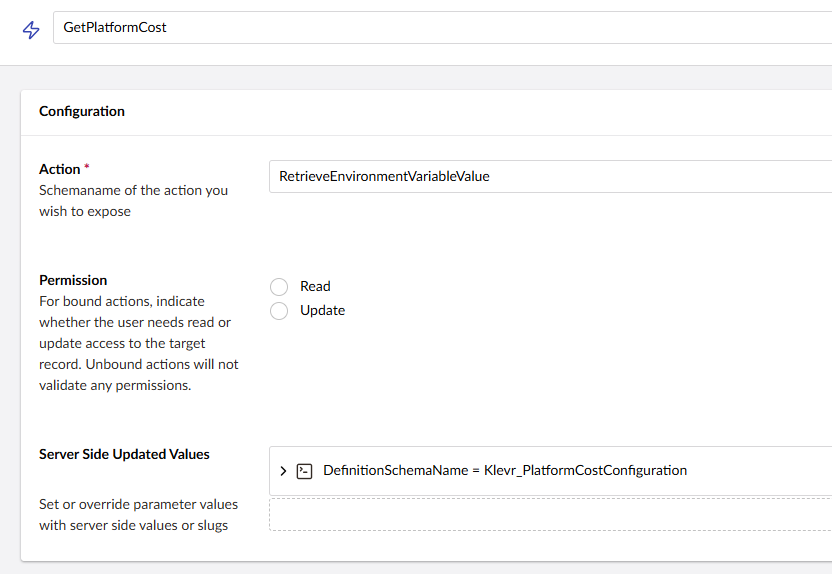
The "GetPlatformCost" API endpoint calls the RetrieveEnvironmentVariableValue API but hard codes the DefinitionSchemanName parameter value on the server side to "klevr_PlatformCostConfiguration". Even if you try specify a different value client side, the server side will take precidence, and therefore this endpoint only exposes 1 environment variable, even though it uses a CE API endpoint that can retrieve any variable. Some slugs are supported, e.g. @self.
CSRF Tokens
In order to perform any write action (create, post, delete, or executing a custom action) you need to include a CSRF token in the header of your request. This helps prevent rogue websites constructing forms to submit data directly to the API.
CSRF tokens are generated on dynamics forms and are stored in hidden fields called "__requestverificationtoken". If your script is on a form, you can read this value from the DOM and include it. Alternatively you can make a call to /api/csrf to get a csrf token for the current user's session.
It needs to be included in a header called 'x-csrf-token'. E.g.:
var csrf = await(await fetch("/api/csrf")).text();
var res = await fetch("/api/contact", {method: "POST", body: JSON.stringify({"firtname": "Bob"}), headers: {"Content-type":"application/JSON", "X-CSRF-TOKEN":csrf}});
var id = await res.json();
Who Am I?
if you GET /api/whoami you will be given a JSON response with the logged in user's login name, contact guid and an array of Web roles. It also works for anonymous (username and login will be empty strings, roles will be "anonymous")
Role Based Protection
Using the same method in Umbraco as on standard pages, you can restrict API endpoint access to specific web roles by selecting "Do Something Else" -> "Restrict Public Access" and "Apply Group Based Protection" on the page. Select the role(s) you want to grant access to for the selected endpoint. For the login and Error page, you can select any page, these are not used.
Security Considerations
You need to configure table permissions in the portal for any of the records or queries that you define in the API. You need to consider security at all times, knowing that the Guids of records are exposed here and can potentially be used by malicious users, for example injecting it into other pages to load details for records or see related records. It is best to limit access to non-logged in users for most API endpoints, except you you may specifically want to expose public data (e.g. a list of published events).
Open Questions
N:N relationships
Files
Last updated on