
Portal Library Variables Guide
When releasing the portal code for a Klevr Portal Instance, a library variable group MUST be set up.
When releasing the portal code for a Klevr Portal Instance, a library variable group MUST be set up. If this guide is not followed correctly, then it is possible that the Klevr portal will not be able to start at all, or, it will not function properly. Proceed with caution.
Library Variable Group
| Variable Named | Value | Required? |
|---|---|---|
| Dynamics.Url | https://orgxxx.crm6.dynamics.com/ | YES |
| Dynamics.AppId | App ID for app registration in Azure that has access to Dynamics. Leave blank to use the website's managed identity for authentication. Be sure to add the managed identity as a sys admin to the dynamics environment | No |
| Dynamics.Secret | Secret key for the App Registration above Leave blank to use the website's managed identity for authentication. | No |
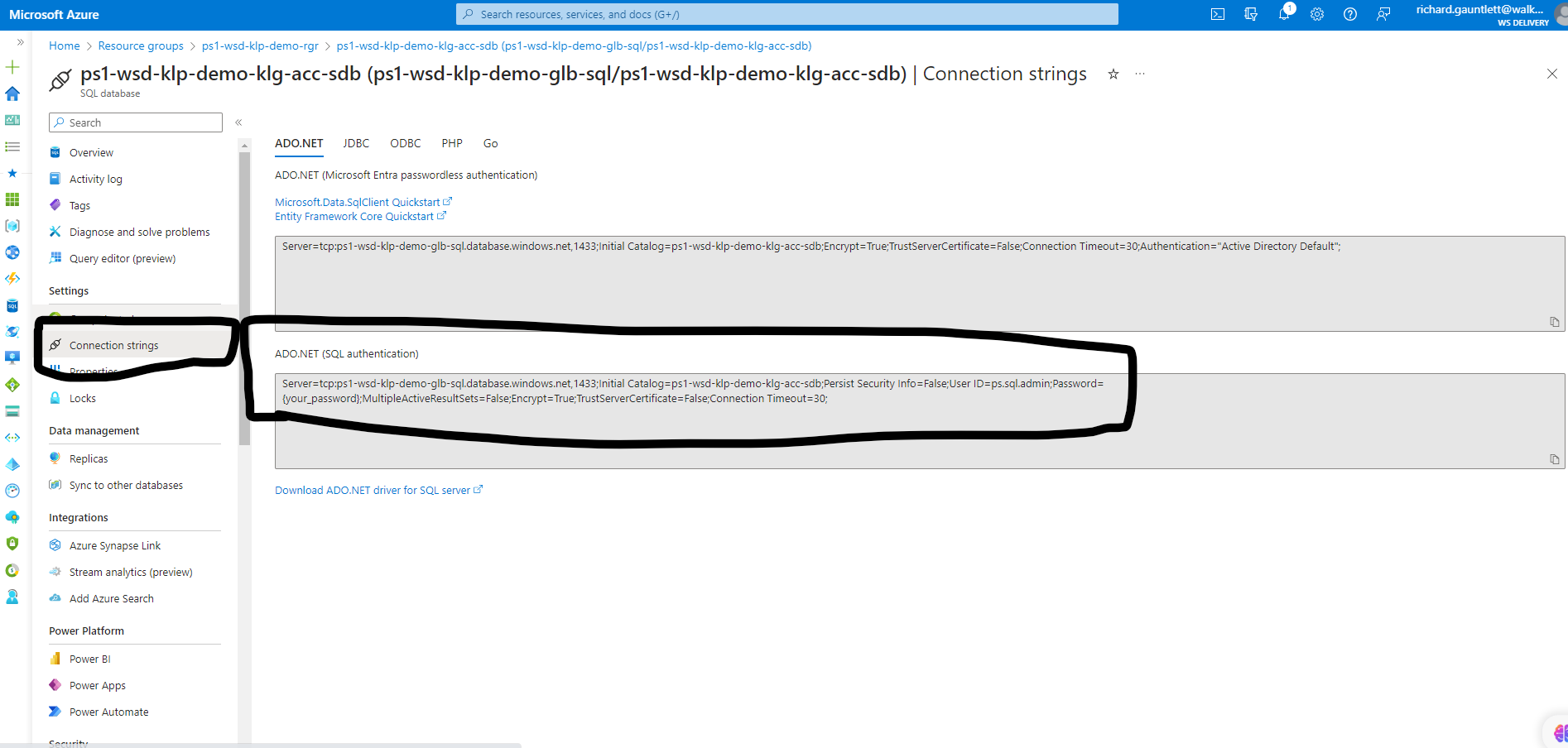
| ConnectionStrings.umbracoDbDSN | Full Connection string to SQL DB. Typically this is automatically managed by the infra/deployment pipeline | Yes |
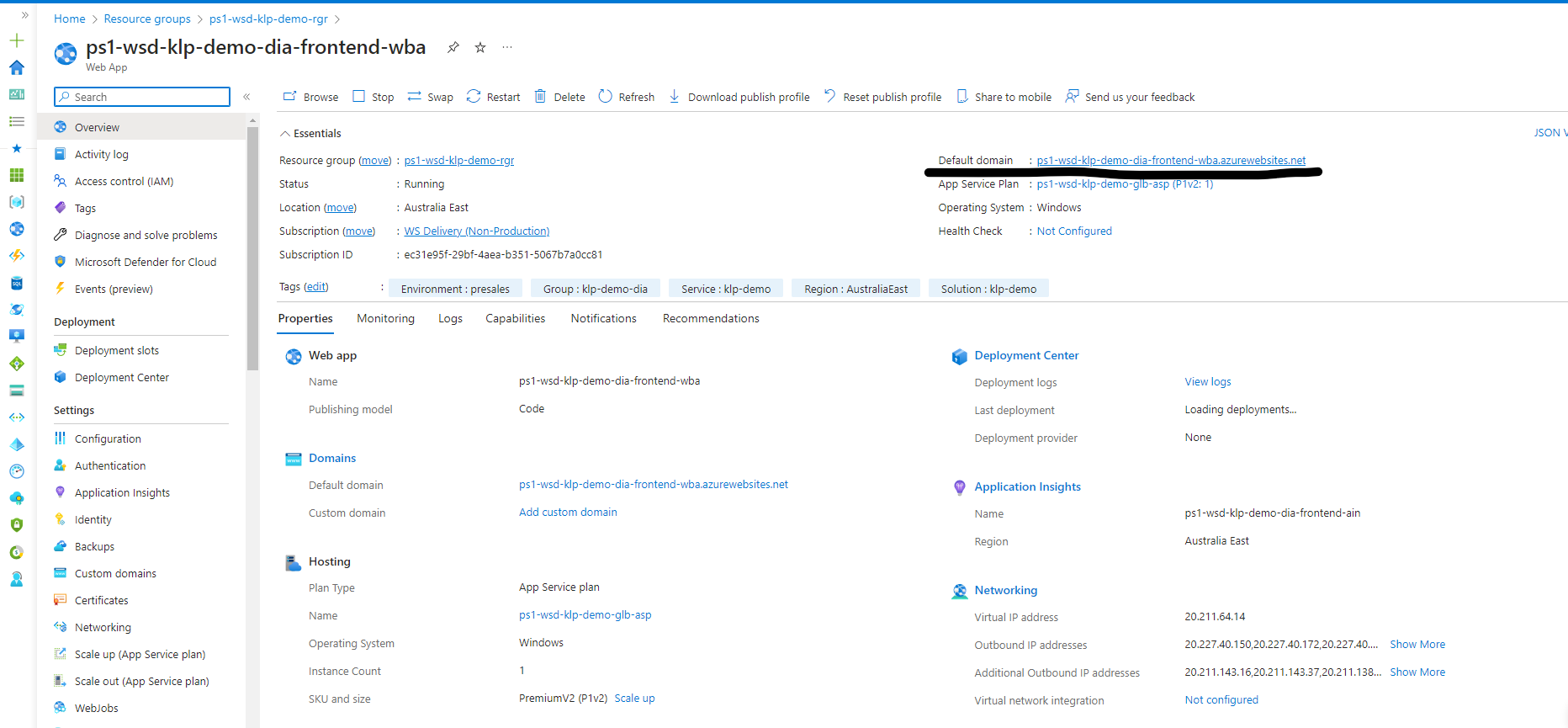
| Umbraco.CMS.WebRouting. UmbracoApplicationUrl | https://{{frontend url for web app}} | Yes (will cause issues if incorrect) |
| Umbraco.Storage.AzureBlob.Media. ConnectionString | Connection String for the Storage account that contains the media folder. | Yes (unless you set Klevr.UseLocalStorage = true) |
| Klevr.CustomerCode | 3-4 letter customer code. This value MUST match the customer code within WS internal dynamics for billing purposes. | Yes |
| Serilog.MinimumLevel.Override. KlevrPortal | This value will default to Warning if the variable is not added. However, changing this to "Debug" (case sensitive!) will make it much easier to develop in the portal. | No |
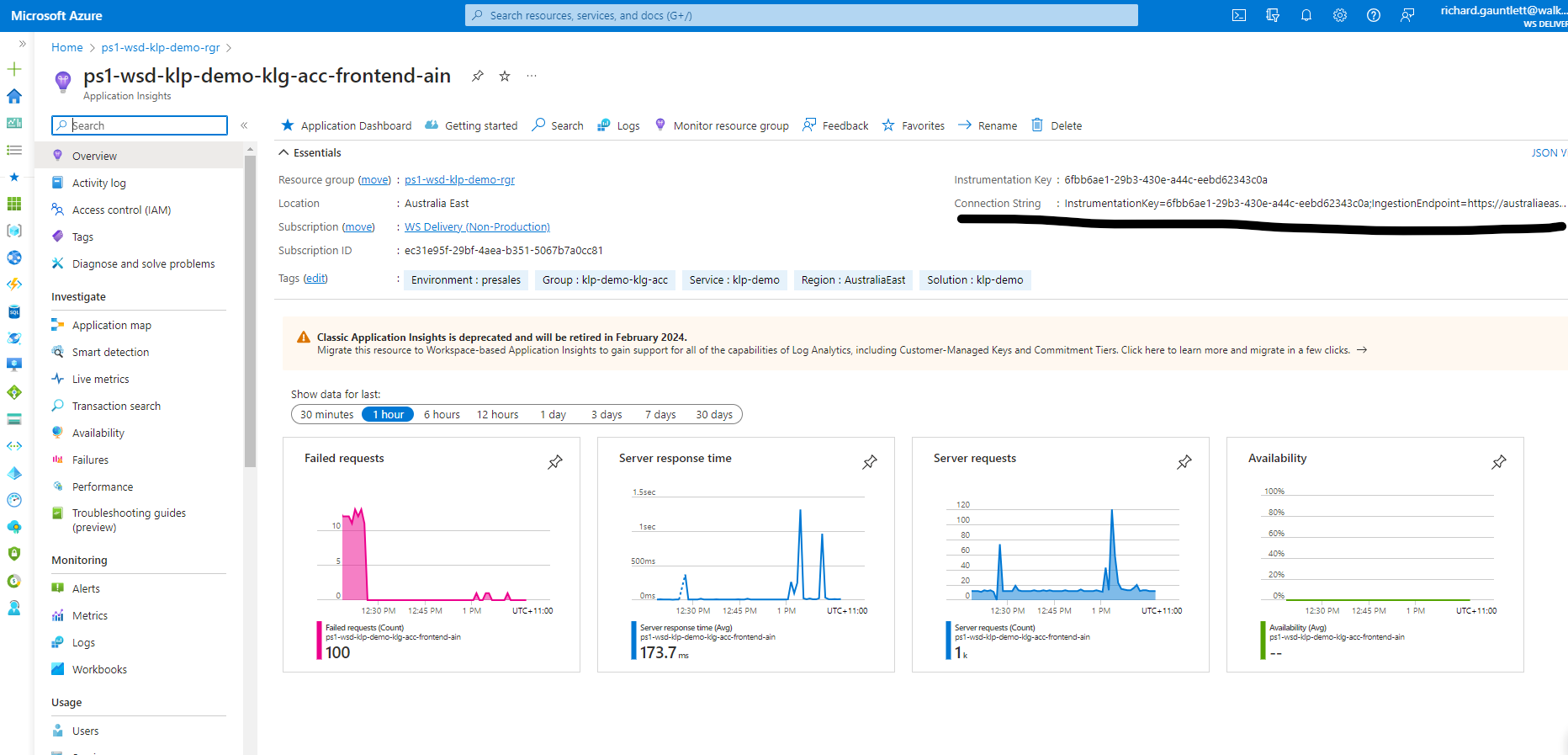
| ApplicationInsights.ConnectionString | Full Connection string from application insights | Yes, if you want app insights logging |
| Klevr.AllowBackofficeADLogin | Boolean. If set to "true" then make sure to follow the rest of the required setup steps in the appropriate guide. | Default= false |
| Klevr.AllowFrontendADLogin | Boolean.If set to "true" then make sure to follow the rest of the required setup steps in the appropriate guide. | Default= False |
| Klevr.AllowFrontendB2CLogin | Boolean. If set to "true" then make sure to follow the rest of the required setup steps in the appropriate guide. | Default= False |
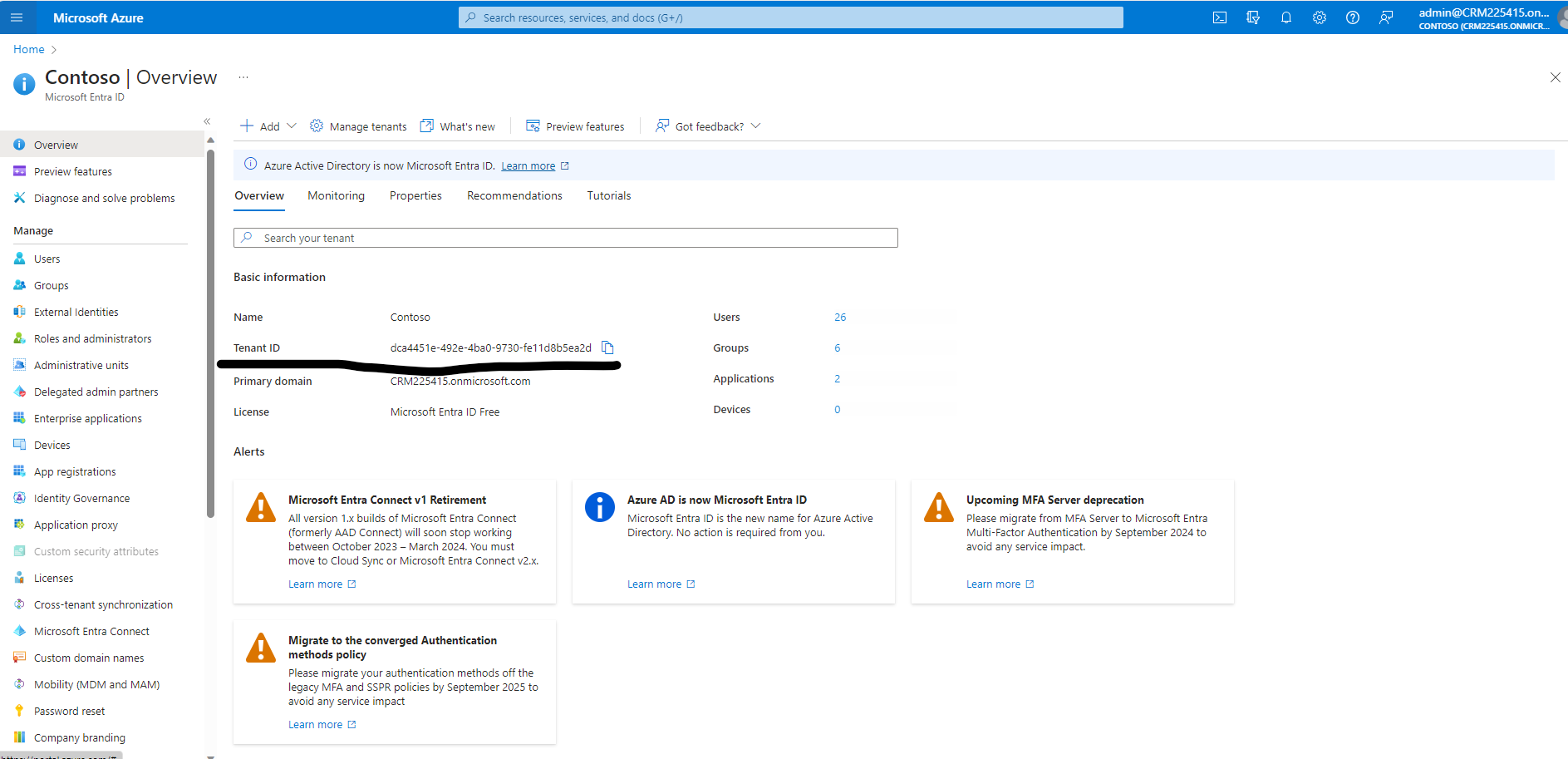
| Klevr.Authority | https://login.microsoftonline.com/{{Your tenant ID}}/v2.0/ | If AD Login Required |
| KlevrArtifactVersion | Specific Version of Portal Code to be released to the web app. * by default will release the most recent version. | Yes |
| Umbraco.CMS.Global.Smtp .From .Host .Username .Password .Port (default 587) .SecureSocetOptions (default auto) | The Sendgrid account has been configured for the customer. If the customer does not have a Sendgrid account, then this variable can be removed from the grid. However, this will result in a default email account being used. This email account has been blocked by Sendgrid. This will mean that users will not receive password reset or verification emails. DO NOT leave this variable blank, your portal will not work if this variable is blank. | Yes, if you want emails to be sent |
| Umbraco.CMS.Content.Notifications. Email | The Sendgrid email address that has been configured for the customer. If the customer does not have a Sendgrid account, then this variable can be removed from the grid. However, this will result in a default email account being used. This email account has been blocked by Sendgrid. This will mean that users will not receive password reset or verification emails. DO NOT leave this variable blank, your portal will not work if this variable is blank. | Yes |
| Klevr.MemberSessionTimeout | Timeout in minutes for members (external users) of the portal. This will be the time since the last interaction when they are automatically timed out, and will need to log in again to continue. Default is blank, meaning they won't be forcibly logged out, even if they close the browser. They are logged out whenever the portal is restarted. | blank for infinite (default), or number of minutes |
| Klevr.HTMLProcessingInLists | "PlainText" (default) or "RichText". Controls whether lists will show field contents containing rich text in a formatted manner (e.g. bold italic) or just plain text. | Default Plaintext |
| Klevr.DisableLocalLogin | "true" or "false". Toggles the option to use local logins. If switched off and you have one External Auth option, it will automatically redirect, otherwise if you have multiple, the butoons for each will be rendered and the user can click a specific one to redirect to. | Default false |
| Klevr.IgnoreNuCache | "true" or "false". Toggles the option to enable or disable NuCache used by Umbraco for loading published content and media when available. Setting this to false will ignore the cache and the data is always fetched from the database. | Default true |
| Klevr.PwdMixCase | Force the use of upper and lower case letters in passwords | default false |
| Klevr.PwdIncludeNumbers | Force the use of numbers in passwords | default false |
| Klevr.PwdIncludeSpecialCharacters | Force the use of Special Characters in passwords Note that recent studies and recommendations found that simply using long passwords are better as users don't write them down, but if they are forced to use weird passwords, they tend to write them down. | default false |
| Klevr.PwdMinLength | Specify the minimum length for passwords | default 10 |
| Klevr.SurveyJSLicenseKey | Set it to the SurveyJS license key. Can be found by logging into surveyjs.io. | For |
| Klevr.BusinessNumberAPIKeyAU | Set this to the AUBN license key found at https://abr.business.gov.au/ | For use of AUBN control |
| Klevr.BusinessNumberAPIKeyNZ | Set this to the NZBN license key found at https://www.nzbn.govt.nz/ | For use of NZBN control |
| Klevr.AddressFinderAPIKey | Set this to the license key found on the AddressFinder dashboard. https://addressfinder.com/ | For use of the AddressFinder control |
| Klevr.MatchRegristrationOnExistingEmailAddress | Set this to true to enable logic for duplicate registering email addresses. | default false |
| Klevr.IgnoreStripeApiVersionMismatch | Set to ignore strict version checking on Stripe. DO NOT ENABLE ON PRODUCTION, but use for demo and non-prod environments. Ensure the word in the version matches (e.g. acacia) as Stripe changes the word when there are breaking changes. | False (default) - Strict Check. True to allow a mismatch. |
Application Insights Connection String
Database Connection String
Azure Entra ID (Tenant)
Web App URL
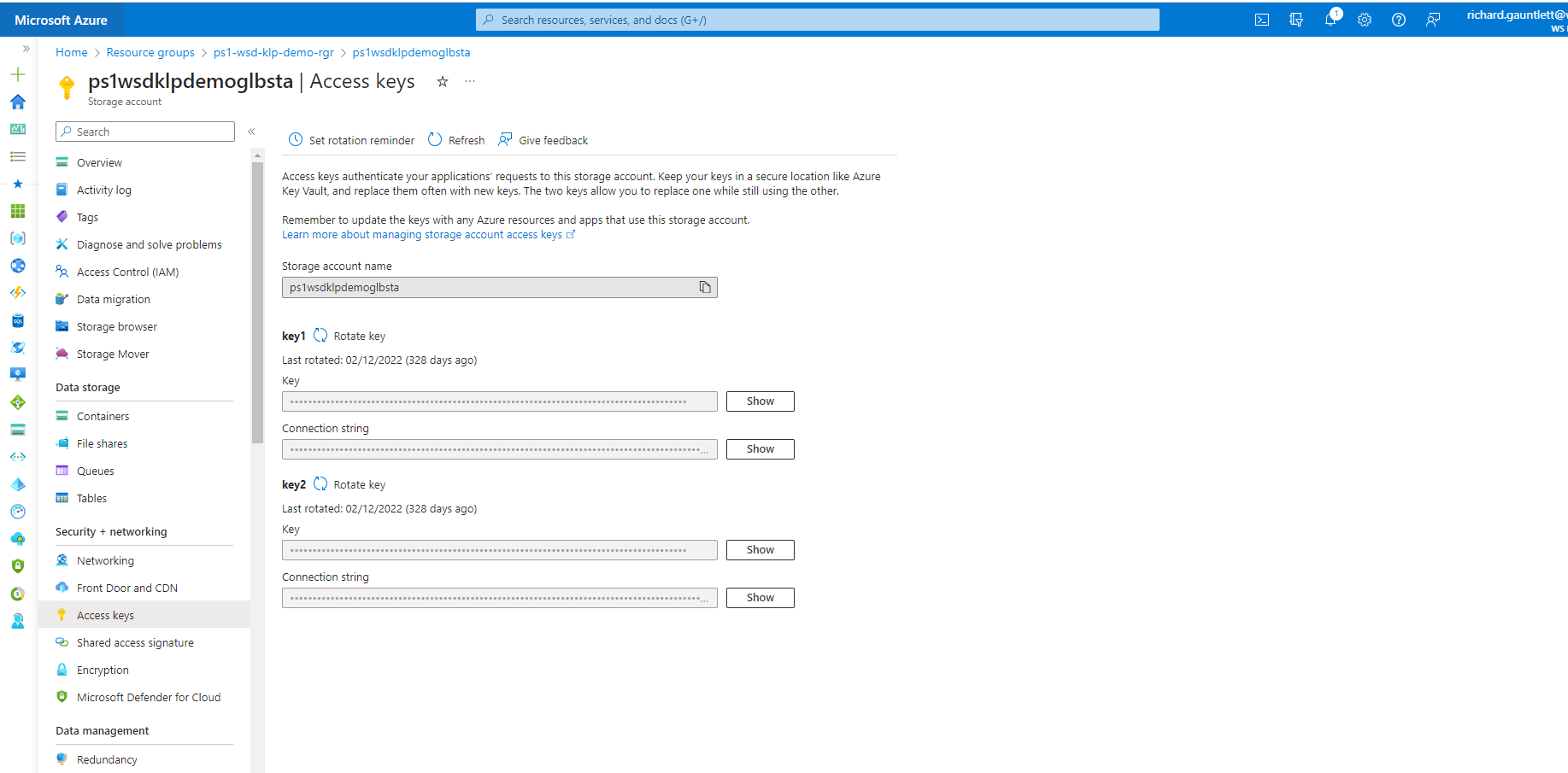
Storage Account Connection String
💡 See Also
- Other variables will need to be added for specific functionality (Stripe integration, azure blob attachments, etc...). However, those variables are detailed in the guides for those functionalities. The variables mentioned in this guideline are the baseline variables required for all portal deployments.
Last updated on