
How to Guide - Gift Import
NOTE: the query is currently set up to look at the following:
Detailed Instructions
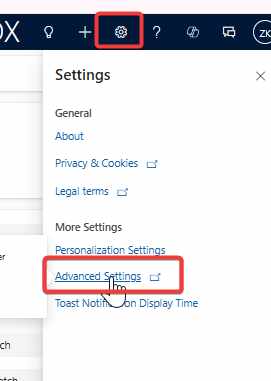
- Download the 'Gift Import' template by going to 'Advanced Settings'.
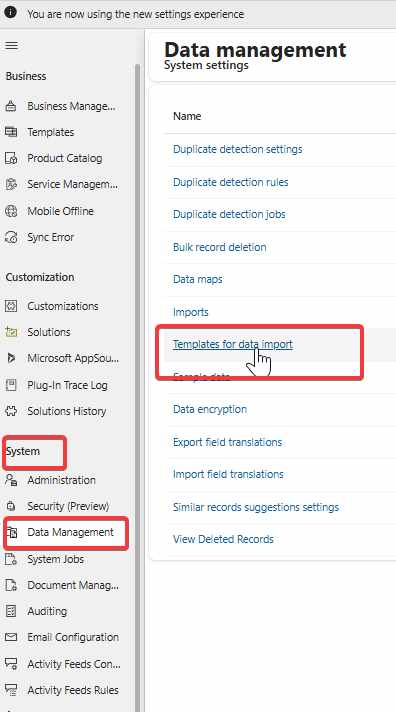
- Under 'System' find 'Data Management' and click onto 'Templates for data import'
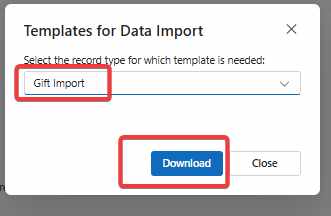
- Search for 'Gift Import' and click 'Download'
- Open the excel template and remove any unessiary fields.
- The minimum mandatory fields are:
- Gfit Type
- Amount
- Book Date
- Donor Match
- Primary Contact Match
- Designation Match
- Campaign Match
- Any additional fields marked as mandatory through customisation by the delivery team.
- The minimum mandatory fields are:
- Fill in the data required for a the Import, you can have as many lines needed.
- Go to Gift Batch view, and select 'Import Gifts From Excel' button on the ribbon.
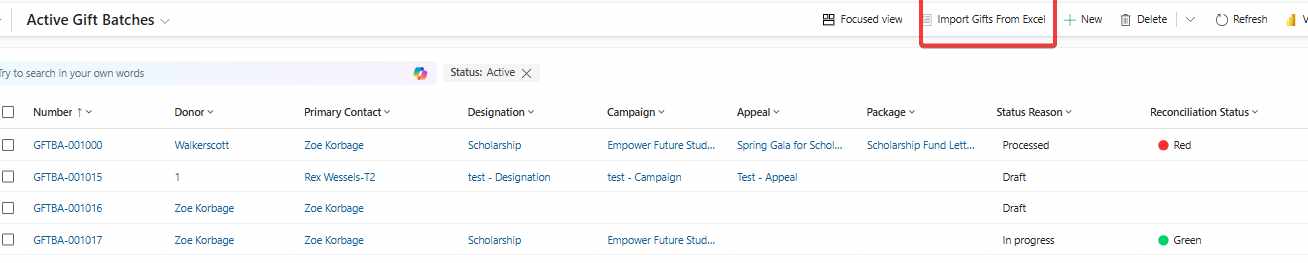
- Add your template you got from 'Gift Import'
- At this point the system will do one of two things:
- Create a new Gift Batch record, if this is the first time importing the template.
- Updates an exsiting Gift Batch that matches the import file name.

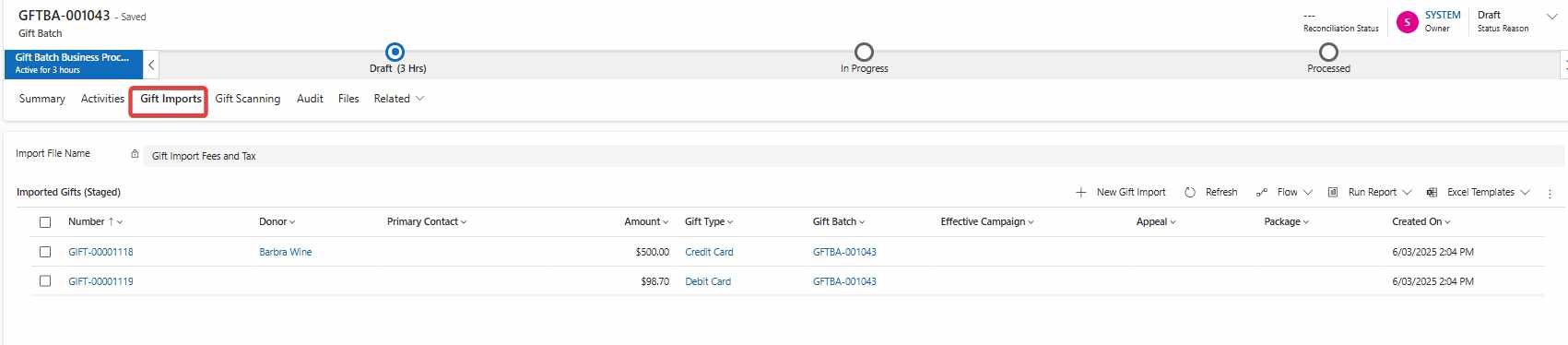
- When you click into the Gift Batch record after the import, go to 'Gift Imports' tab where you will find all the line items from the template:
- Select one of the Gift Import records, and find the 'Lookup Match' tab. This is where you can resolve and match.
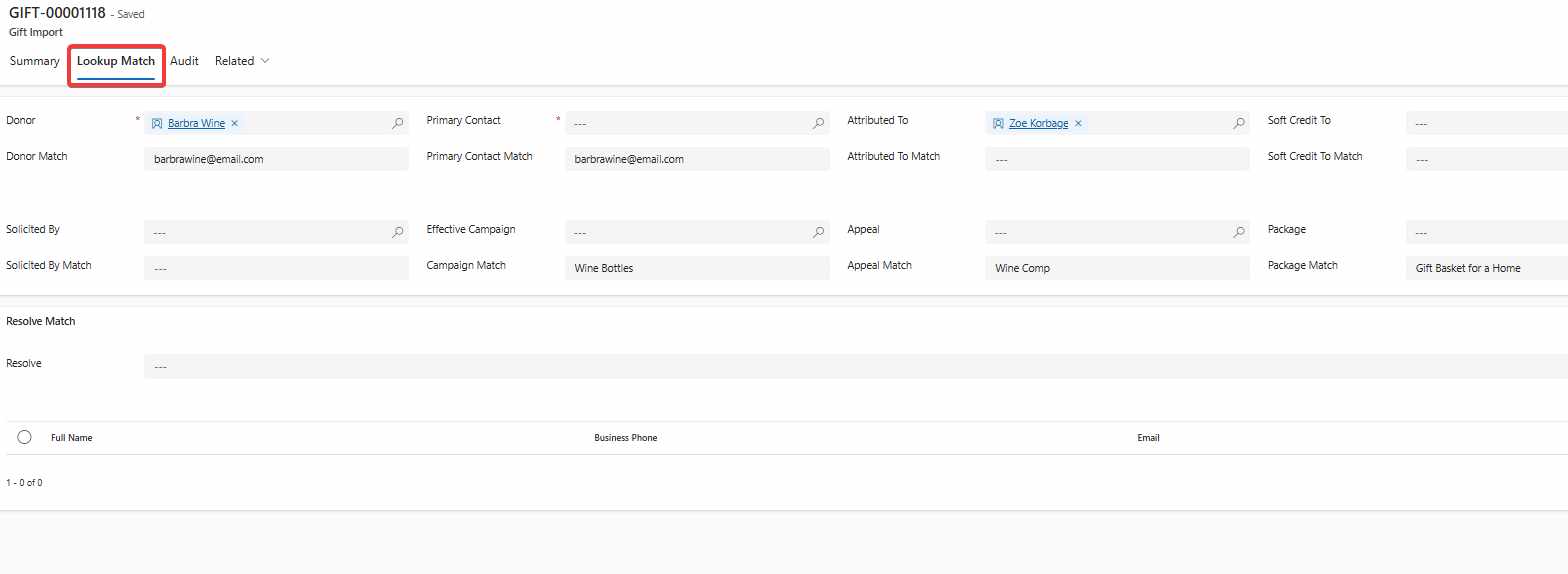
- In my example, I have 'Primary Contact', 'Effective Campaign', 'Appeal' and 'Package' currently unmapped. To do this, find the 'Resolve' dropdown to find a match:
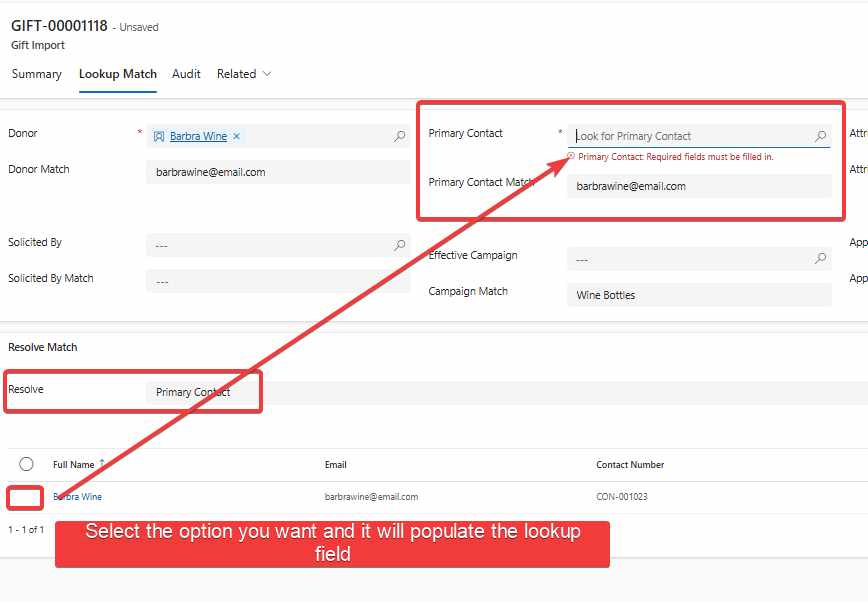
- For the Donor Match, if the Donor is an Account, select 'Donor Account' from the 'Resolve' dropdown. If it is a Contact, select 'Donor Contact' from the 'Resolve' dropdown.
- Once you have selected all the matches, save and close the record.
- Do the same if you have more records.
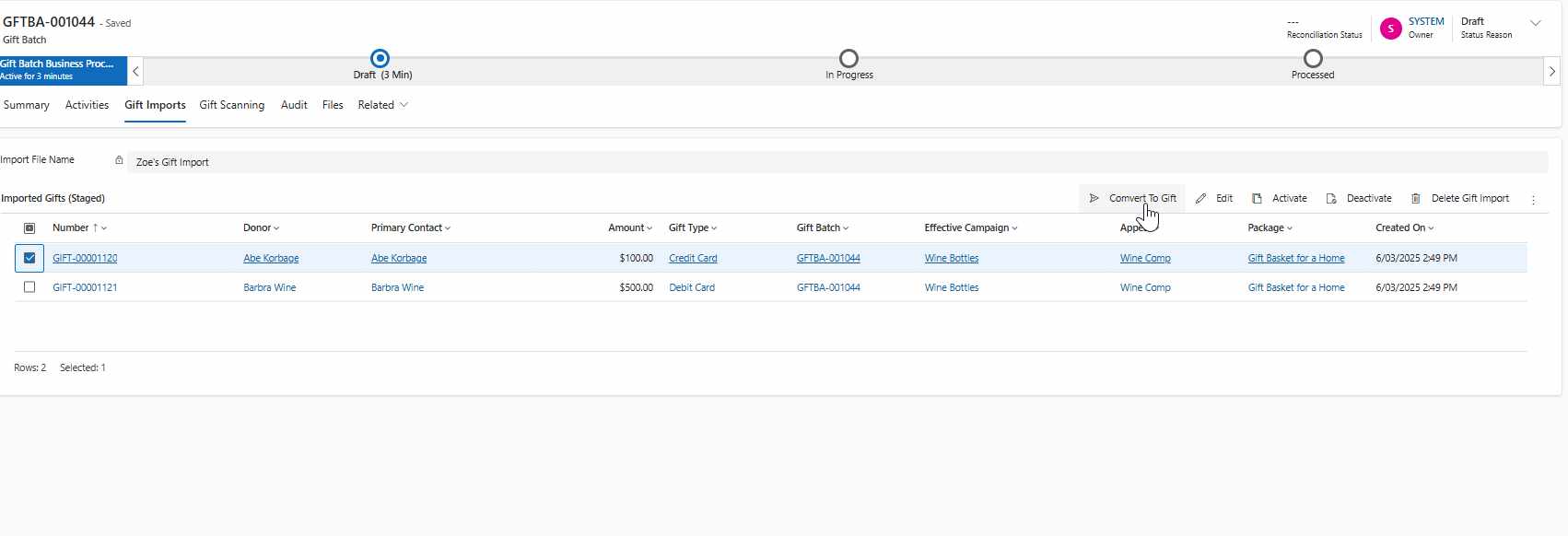
- When you are happy to convert the records to Gifts, there are two ways to do so:
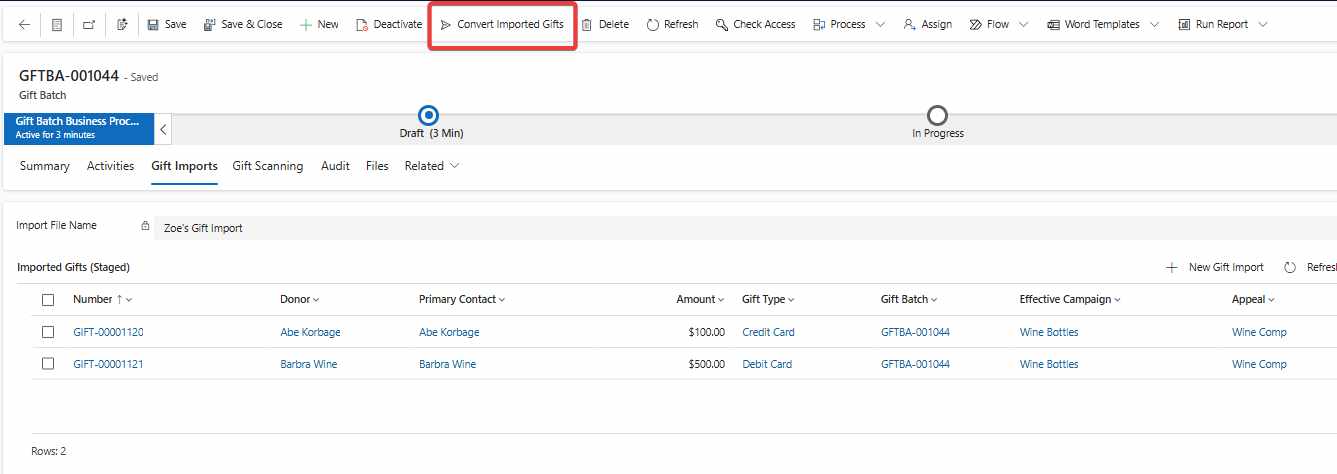
- Convert all Gift Imports to Gifts by clicking on the 'Convert Imported Gifts' button in the ribbon:
- Convert selected records by clicking on 'Convert to Gift' button in the subgrid:
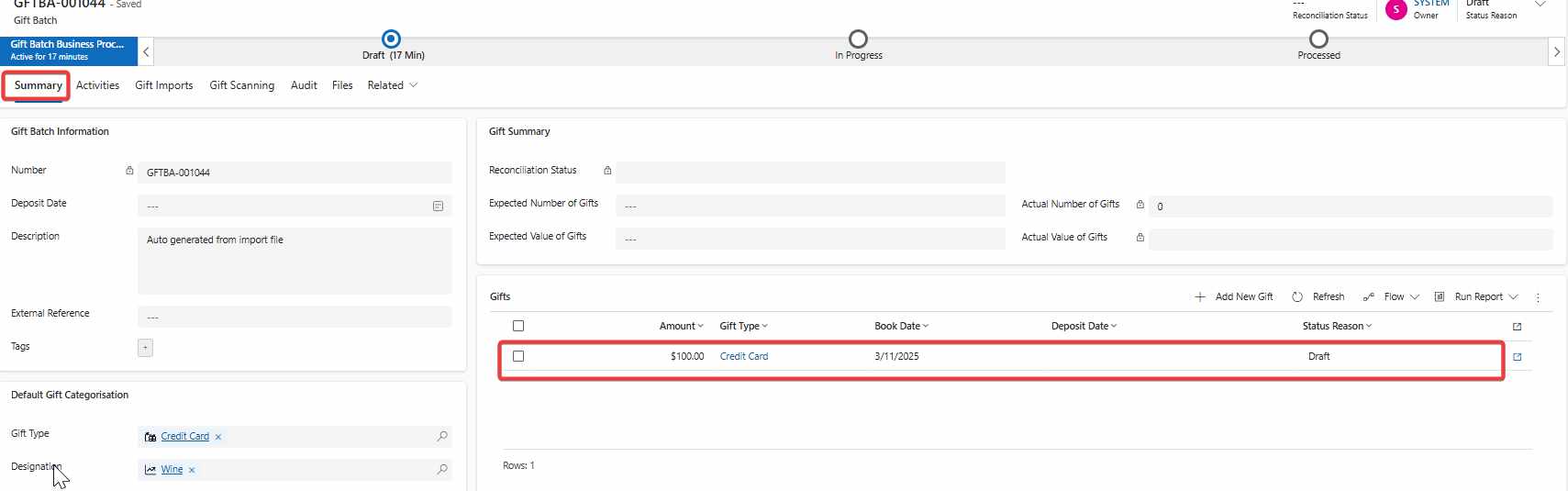
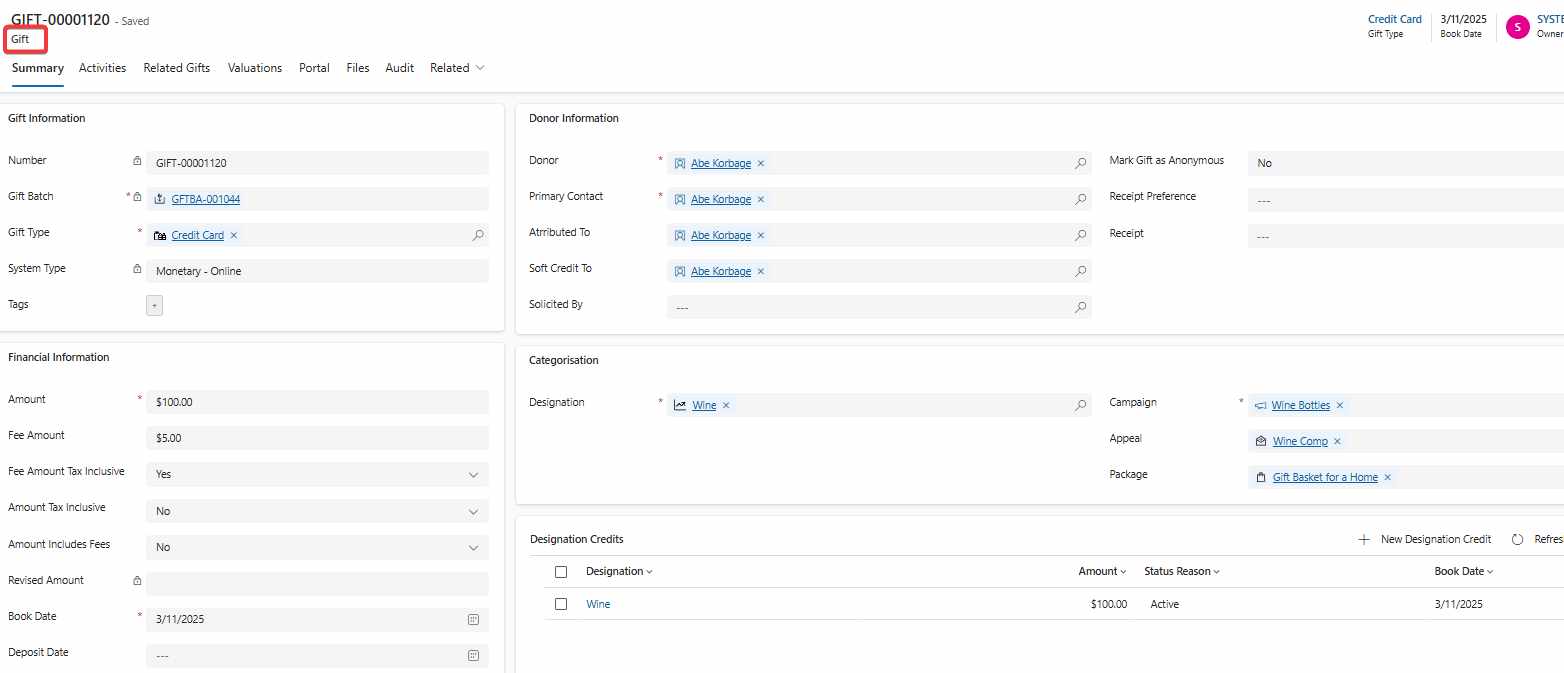
- Go to the 'Summary' tab of the Gift Batch record and find the ' Gifts' section, here you should now see a new Gift record/s
The query is currently set up to look at the following:
- Donor (Account): emailaddress1,emailaddress2, emailaddress3 (from Account)
- Donor (Contact): emailaddress1,emailaddress2, emailaddress3 (from Contact)
- Primary Contact: emailaddress1,emailaddress2, emailaddress3 (from Contact)
- Primary Designation: klevr_name
- Effective Campaign: codename, name
- Appeal: klevr_number, klevr_identifier
- Package: klevr_identifier, klevr_code
- Attributed To: emailaddress1,emailaddress2, emailaddress3 (from Contact)
- Soft Credit To: emailaddress1,emailaddress2, emailaddress3 (from Contact)
- Solicited By: emailaddress1,emailaddress2, emailaddress3 (from Contact)
Adjust 'Resolve' Querie
If you want to add more values or make ajustments to the 'Resolve' drop down you will need to adjust the Querie within 'klevr_giftimportresolvequeries.json'
{
    "Code_344590000": { "FormValue": "klevr_appealmatch", "ResolveAttribute": "klevr_appealid", "Fetch": "<fetch distinct=\"true\"><entity name=\"klevr_appeal\"><attribute name=\"klevr_identifier\"/><order attribute=\"klevr_identifier\" descending=\"false\"/><attribute name=\"klevr_number\"/><attribute name=\"klevr_externalreference\"/><attribute name=\"statuscode\"/><filter type=\"and\"><condition attribute=\"statecode\" operator=\"eq\" value=\"0\"/><filter type=\"or\"><condition attribute=\"klevr_identifier\" operator=\"eq\" value=\"{{formvalue}}\"/><condition attribute=\"klevr_number\" operator=\"eq\" value=\"{{formvalue}}\"/></filter></filter></entity></fetch>" },
    "Code_344590001": { "FormValue": "klevr_attributedtomatch", "ResolveAttribute": "klevr_attributedtoid", "Fetch": "<fetch no-lock=\"false\" distinct=\"true\" count=\"20\"><entity name=\"contact\"><attribute name=\"fullname\"/><order attribute=\"fullname\" descending=\"false\"/><attribute name=\"emailaddress1\"/><attribute name=\"klevr_constituentnumber\"/><attribute name=\"telephone1\"/><attribute name=\"mobilephone\"/><attribute name=\"parentcustomerid\"/><filter type=\"and\"><condition attribute=\"statecode\" operator=\"eq\" value=\"0\"/><filter type=\"or\"><condition attribute=\"emailaddress1\" operator=\"eq\" value=\"{{formvalue}}\"/><condition attribute=\"emailaddress2\" operator=\"eq\" value=\"{{formvalue}}\"/><condition attribute=\"emailaddress3\" operator=\"eq\" value=\"{{formvalue}}\"/></filter></filter></entity></fetch>" },
    "Code_344590002": { "FormValue": "klevr_campaignmatch", "ResolveAttribute": "klevr_effectivecampaignid", "Fetch": "<fetch distinct=\"true\"><entity name=\"campaign\"><attribute name=\"name\"/><attribute name=\"campaignid\"/><attribute name=\"codename\"/><attribute name=\"klevr_campaigntypeid\"/><attribute name=\"expectedrevenue\"/><attribute name=\"actualstart\"/><attribute name=\"actualend\"/><attribute name=\"klevr_campaign_defaultdesignation\"/><order attribute=\"name\" descending=\"false\"/><attribute name=\"statuscode\"/><filter type=\"and\"><condition attribute=\"statecode\" operator=\"eq\" value=\"0\"/><filter type=\"or\"><condition attribute=\"codename\" operator=\"eq\" value=\"{{formvalue}}\"/><condition attribute=\"name\" operator=\"eq\" value=\"{{formvalue}}\"/></filter></filter></entity></fetch>" },
    "Code_344590003": { "FormValue": "klevr_donormatch", "ResolveAttribute": "klevr_customerid", "Fetch": "<fetch no-lock=\"false\" distinct=\"true\" count=\"20\"><entity name=\"contact\"><attribute name=\"fullname\"/><order attribute=\"fullname\" descending=\"false\"/><attribute name=\"emailaddress1\"/><attribute name=\"klevr_constituentnumber\"/><attribute name=\"telephone1\"/><attribute name=\"mobilephone\"/><attribute name=\"parentcustomerid\"/><filter type=\"and\"><condition attribute=\"statecode\" operator=\"eq\" value=\"0\"/><filter type=\"or\"><condition attribute=\"emailaddress1\" operator=\"eq\" value=\"{{formvalue}}\"/><condition attribute=\"emailaddress2\" operator=\"eq\" value=\"{{formvalue}}\"/><condition attribute=\"emailaddress3\" operator=\"eq\" value=\"{{formvalue}}\"/></filter></filter></entity></fetch>" },
    "Code_344590004": { "FormValue": "klevr_packagematch", "ResolveAttribute": "klevr_packageid", "Fetch": "<fetch distinct=\"true\"><entity name=\"klevr_package\"><attribute name=\"klevr_identifier\"/><attribute name=\"createdon\"/><order attribute=\"klevr_identifier\" descending=\"false\"/><attribute name=\"klevr_externalreference\"/><attribute name=\"klevr_appealid\"/><attribute name=\"klevr_campaignid\"/><attribute name=\"statuscode\"/><filter type=\"and\"><condition attribute=\"statecode\" operator=\"eq\" value=\"0\"/><filter type=\"or\"><condition attribute=\"klevr_identifier\" operator=\"eq\" value=\"{{formvalue}}\"/><condition attribute=\"klevr_code\" operator=\"eq\" value=\"{{formvalue}}\"/></filter></filter></entity></fetch>" },
    "Code_344590005": { "FormValue": "klevr_primarycontactmatch", "ResolveAttribute": "klevr_primarycontactid", "Fetch": "<fetch no-lock=\"false\" distinct=\"true\" count=\"20\"><entity name=\"contact\"><attribute name=\"fullname\"/><order attribute=\"fullname\" descending=\"false\"/><attribute name=\"emailaddress1\"/><attribute name=\"klevr_constituentnumber\"/><attribute name=\"telephone1\"/><attribute name=\"mobilephone\"/><attribute name=\"parentcustomerid\"/><filter type=\"and\"><condition attribute=\"statecode\" operator=\"eq\" value=\"0\"/><filter type=\"or\"><condition attribute=\"emailaddress1\" operator=\"eq\" value=\"{{formvalue}}\"/><condition attribute=\"emailaddress2\" operator=\"eq\" value=\"{{formvalue}}\"/><condition attribute=\"emailaddress3\" operator=\"eq\" value=\"{{formvalue}}\"/></filter></filter></entity></fetch>" },
    "Code_344590006": { "FormValue": "klevr_softcredittomatch", "ResolveAttribute": "klevr_softcreditto", "Fetch": "<fetch no-lock=\"false\" distinct=\"true\" count=\"20\"><entity name=\"contact\"><attribute name=\"fullname\"/><order attribute=\"fullname\" descending=\"false\"/><attribute name=\"emailaddress1\"/><attribute name=\"klevr_constituentnumber\"/><attribute name=\"telephone1\"/><attribute name=\"mobilephone\"/><attribute name=\"parentcustomerid\"/><filter type=\"and\"><condition attribute=\"statecode\" operator=\"eq\" value=\"0\"/><filter type=\"or\"><condition attribute=\"emailaddress1\" operator=\"eq\" value=\"{{formvalue}}\"/><condition attribute=\"emailaddress2\" operator=\"eq\" value=\"{{formvalue}}\"/><condition attribute=\"emailaddress3\" operator=\"eq\" value=\"{{formvalue}}\"/></filter></filter></entity></fetch>" },
    "Code_344590007": { "FormValue": "klevr_solicitedbymatch", "ResolveAttribute": "klevr_solicitedbyid", "Fetch": "<fetch no-lock=\"false\" distinct=\"true\" count=\"20\"><entity name=\"contact\"><attribute name=\"fullname\"/><order attribute=\"fullname\" descending=\"false\"/><attribute name=\"emailaddress1\"/><attribute name=\"klevr_constituentnumber\"/><attribute name=\"telephone1\"/><attribute name=\"mobilephone\"/><attribute name=\"parentcustomerid\"/><filter type=\"and\"><condition attribute=\"statecode\" operator=\"eq\" value=\"0\"/><filter type=\"or\"><condition attribute=\"emailaddress1\" operator=\"eq\" value=\"{{formvalue}}\"/><condition attribute=\"emailaddress2\" operator=\"eq\" value=\"{{formvalue}}\"/><condition attribute=\"emailaddress3\" operator=\"eq\" value=\"{{formvalue}}\"/></filter></filter></entity></fetch>" }
}
You will see it has the ID of the dropdown, for example ('Appeal' eq "344590000"), then it has the match field that contains the string to search for, it has the name of the field to put the result into when the user selects one in the grid, and it has the fetch query to run in the grid, with a placeholder {{formvalue}} which the core replaces with the value from the "Match" field.
Adjust the Querie by adding another line to the file with the value off the dropdown, the match field and the lookup field along with the query to run and display in the subgrid.
Please see Code Components for more details on Gift Import and Gift Import Conversion.
Last updated on