
Klevr Forms 2.0 Scoring
Scoring allows you to allocate points to certain answers and items, and have the product automatically add up the socres for you.
Feature Overview
Scoring allows you to allocate points to certain answers and items, and have the product automatically add up the socres for you. For instance an assessment can be automatically scored based on answers provided on the form. The score will be written back to a score field on the record. It is also kept in the json response field as part of the answers.
Only certain questions can be used for automatic scoring. Please keep this in mind if you design a scoring form.
Assumptions
You are using Klevr Forms 2.0 (SurveyJS) for your forms.
Dependencies
The following are dependencies for this feature:
- You require Dynamics CE product version 2.4.9 or later, and Portal version 2.12.1 or later. This feature combines the Dynamics configuration and portal functionality, and therefore are dependent on each other.
Design Details
Within the form designed in Dynamics, when a question with a type that requires items are added to the form, the items can be configured with a score. For instance, a picklist question now has a 3rd column in the item editor for score:
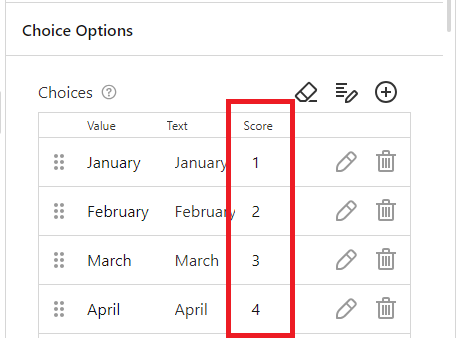
Currently only Picklists, Radio Buttons, Checkboxes, Rating Scales, and Single Select Matrixes are supported. Multiselect and Rating types are supported but with caveats. Complex constructs like repeatable sections with the above question types, etc are not supported.
For Multiselect or Rating options, the maximum achievable score will be calcualted by taking the maximim score of all the items, e.g. if you have scores of 1, 2, and 3, the maximum score will be 3, and not 6 (3+2+1). In addition to this, the score assigned will be the first item selected, not the sum of all items selected, therefore if item 2 and 3 is selected, the score will be 2 and not 5.
The following scores will be calculated:
Maximum Score: The sum of all the maximum scores allocated to each question.
Total Score: The sum of all the scores for all selected items for all questions (multiselect will only be the first selected)
Page Score: The total score per page, as an array. The sum of all page scores will match the Total Score. E.g. if you have a socre of 3 on page 1 and a score of 5 on page two, the total score would be 8.
Maximum and total scores are written to the associated fields on the Form Response Record. Page scores are not written to a field, but forms part of the response json.
The fields in the reponse JSON is called klevr_totalScore, klevr_maximumScore and klevr_pageScore. Do not give your questions these names.
To display running totals or overall totals on your survey to the user completing it, you can use the following technique:
Add a question of type "Expression" to your form. You can have one at the top of each page, at the bottom of each page, or at the end or wherever you deem neccesary.
In the Expression part, write an expression similar to the following (adjust it according to your needs):
"Page Total: " + {klevr_pageScore[0]} + " Overall Total: " + {klevr_totalScore} + " Out of " + {klevr_maxScore}{...} denotes the value of an answer. The totals are added as answers to the survey, and therefore {klevr_totalScore} will be replaced with the score calculated thus far on the form. It is calculated every time an answer is changed.
The page score is an array with a length that matches the number of pages on your survey, therefore klevr_pageScore[0] will be the first page, klevr_pageScore[1] would be the second page, and so forth. If you are adding a sub total on each page, remember to match the number in the expression with the page that you are on.
Question Weight
In addition to score being added, we have also added another property "Weight", The weight property is added to questions that also contain the score. The weight property is set in the Form Editor in CE. When calculating the weight, we multiply the score by the weight. So if a Score is set to 5, and the weight is set to 5 the weighted score will equate to 25.
We only support weights that are integers.
Security Considerations
There are no additional security considerations. This is standard functionality on the form, but do not have to be used if it is not required.
🚫 Out of Scope
- Scoring all question types (e.g. string)
- Weighting. This may be added in a future version, but for now, allocating weighted values to items is the only way.
- Recalculation of submitted forms. If you change the values allocated to questions, they will not recalculated for existing submissions. They will apply to future submissions, but this will cause discrepancies between submission scores. It is recommended to copy the form to make adjustments if you already have submissions, so that the form can be considered in conjunction with the score to do comparisons between multiple submissions.
- Custom Scoring, or providing your own function as part of this scoring. You can inject your own scoring functions on your own scoring fields if required, but extending or modifying the product scoring is not recommended.
📎 References
- SurveyJS documentation and examples if you requre .
Last updated on