
Configurable Entity Action
Define your own key user actions on an entity.
Feature Overview
This feature allows you to add your own key actions to an entity, similar to "void" a gift, "decline" an application, "approve" a milestone. Instead of the user just changing the status of the record, this action is invoked from a ribbon button and pops up a dialog to request further information, and keeps a history record of the action and which user performed it, with their notes.
Assumptions
You have Klevr Utilities installed, and are comfortable with creating and editing ribbon buttons.
Dependencies
The following are dependencies for this feature:
- Klevr Utilities
- The regarding poly lookup needs to have a relationship to your target entity for it to work properly.
Design Details
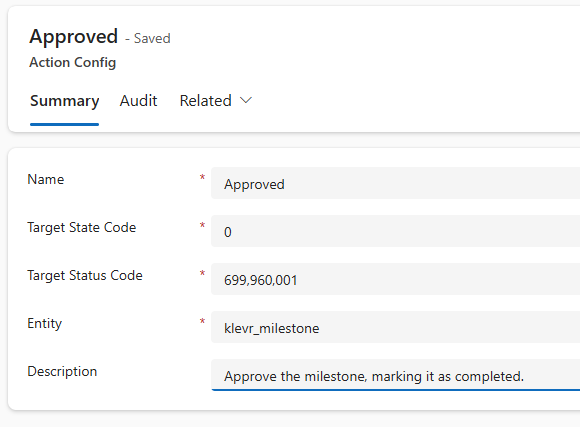
The feature consists of 2 new entities, a Klevr Action Config entity and a Klevr Action entity. The Action Config entity defines the action(s) you want to allow the user to perform on an entity. You specify the name, and a short description. It is important to enter the schema name of the entity for which the action applies to. You can have actions for multiple entities, but the user will only see the actions that apply to the entity they are working on.
You also specify the new state and status that the record should be changed to after the action is invoked.
For Example: to have an action to Approve a milestone, you would create the following Action Config Record:
On the ribbon button, you invoke a function that will pop up the action form. You can specify the action to pre-populate it, or the user can select it form the lookup. The lookup will be filtered by the actions for the current entity. The user have to fill in the notes field. You can add additional fields and have a customer specific script to hide and show fields on the form based on the action selected. When the user clicks on the button, they will see the following pop up:
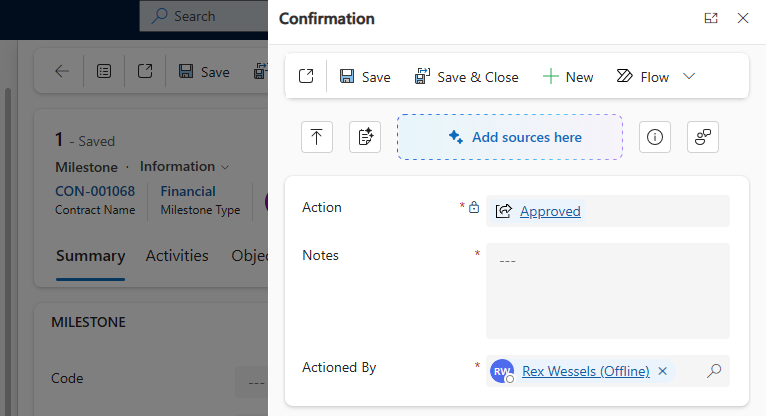
Once the user saves this record, a plugin on the action entity will update the associated milestone's state and status to the one defined on the Milestone Approved action config record. The action will also be saved against the milestone to track history of actions.
Ribbon Button Config
To add a ribbon button, you can either use the modern command bar (but there are limitations to controlling the button visibility) or you can use ribbon workbench. The button can be configured to invoke the klevr_ApplyAction function in the klevr_action.js web resource, or you can invoke your own script that either wraps this function (and add additional functionality) or duplicate the function, modified to your requirements.
The function essentially pops up a right aligned dialog to create a new klevr_action record, associated to the current record. You can optionally specify an action. If action is left blank, the user can select one using the lookup. The lookup is filtered by active action configs associated to this entity.
You need to pass the context as first parameter, and an optional second parameter that is the lookup object of the action you wish to perform. It is an async function that will return null if the user cancels the operation, or an ID of the resulting action record when it is created.
📎 References
Last updated on