
Record Cloning
We have a Clone record functionality across the Klevr products in Dynamics 365 CE.
Feature Overview
We have a Clone record functionality across the Klevr products in Dynamics 365 CE. Cloning functionality can be added to MOST OOTB entities and ALL custom entities. The clone record functionality will clone the Parent record (Selected entity) and related entity records as well. The specific fields that are cloned can be configured for the source entity as well as the related entities to the source.
Design Details
To implement this clone record feature, We used Custom API concept to achieve this functionality (JavaScript, Plugin).
1.Javascript (to pass input params) - This is generic method and can be used/implemented across the CRM products.
2.Plugin (record cloning function and output params to open the copied record)
Create the ribbon button called "Clone Record" in any entity.
Invoke the "CloneRecord" function from clone.ribbon.js web resource.
Create the Environment variable or web resource to configure the cloning rules while cloning the record.
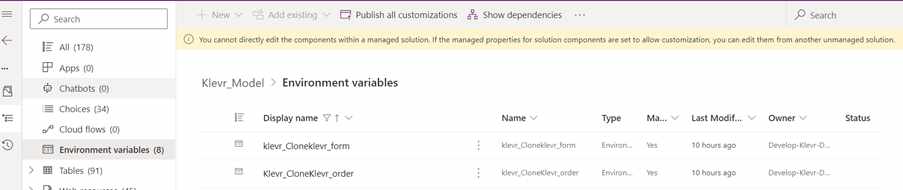
For example, To Clone the account(Parent) and contacts(Child), add another variable here
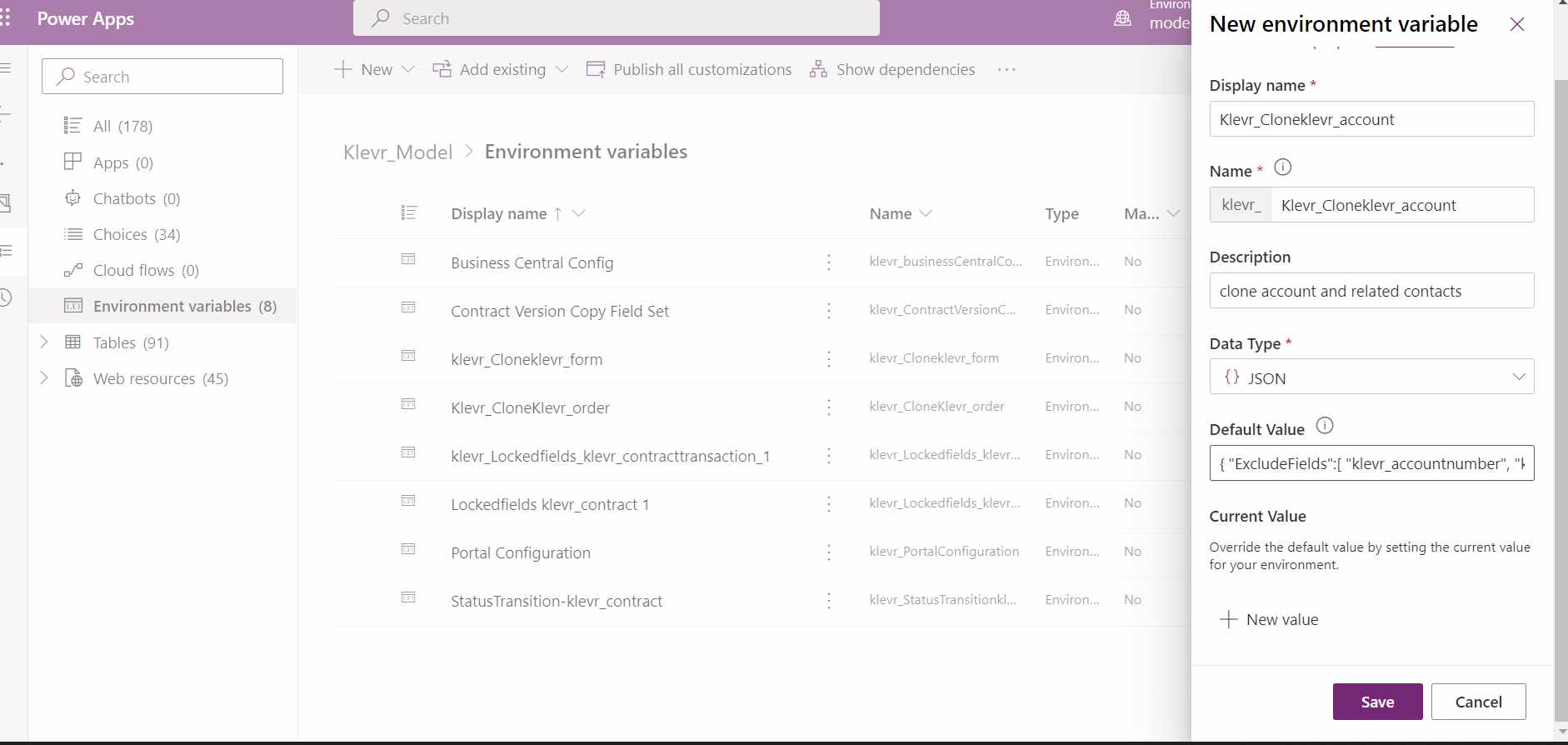
Name: Provide name with respect to account record clone
Description: Provide the description,
Data Type: Select Json type
Default Value: Provide the list of columns needs to be excluded from parent and child records in Json format
Example:
{ "ExcludeFields":[ "klevr_accountnumber", "klevr_accountid" ], "Entities":[ { "Name":"klevr_contact", "ExcludeFields":[ "klevr_accountid", "klevr_contactid" ], "reference":"klevr_accountid" }
Here, Parent is account and Child is contact entity. We are excluding primary attribute(klevr_accountid) and account number(klevr_accountnumber) while cloning the parent record. Similarly, we are excluding klevr_contactid and Parent attribute(klevr_accountid, lookup reference on contact) while cloning the child records.
And, "reference":"klevr_accountid" is relationship name between account and contact.
Setting in more detail
The Clone function will take a setting name, and typically for product The setting should be a JSON string that has the following structure:
string[] ExcludeFields;
CloneChildSetting[] Entities;
string[];
M2M bool SetOverridenCreatedOn;
int statecode;
int statuscode;
int clonedRecordStatecode;
int clonedRecordStatuscode;
string reference;
where CloneChildSetting has the following structure:
string Name;
string[] ExcludeFields;
int statecode;
int statuscode;
string reference;
string[] references;
string[] pass2references;
string[] M2M;
string FetchXmlFilter
bool SetOverridenCreatedOn;
All fields are included in the copy, except for standard system fields and fields specified in the ExcludeFields setting above. The standard excluded field list contains:
"owningbusinessunit", "statuscode", "statecode", "createdon", "ownerid", "modifiedon", "createdby", "modifiedby", "versionnumber", "exchangerate", "timezoneruleversionnumber", "owninguser", "modifiedonbehalfby", "importsequencenumber", "utcconversiontimezonecode", "createdonbehalfby", "owningteam", "overriddencreatedon","processid","traversedpath"
Here's another example of the clone setting:
{
    "ExcludeFields": [  //comma separated list of fields you do not want to copy
        "klevr_formnumber",
        "klevr_formid"
    ],
    "Entities": [ // array of related entities to copy
        {
            "Name": "klevr_section",
            "ExcludeFields": [ //comma separated list of fields you do not want to copy
                "klevr_sectionnumber",
                "klevr_formid",
                "klevr_sectionid"
            ],
            "reference": "klevr_formid" //Field to set as lookup to the new master record
        },
        {
            "Name": "klevr_question",  // second related entity to copy
            "ExcludeFields": [
                "klevr_questionnumber",
                "klevr_formid",
                "klevr_questionid"
            ],
            "reference": "klevr_formid", // lookup to set to new master record
            "references": [   // lookups to other child records that are copied. The order matches the order that the entities are defined in this schema
                "klevr_sectionid", //e.g. set this field to the copied version of the klevr_section record
                ""
            ],
            "M2M": [ //comma separated list of Many To Many relationships to copy.
                "klevr_klevr_validationrule_klevr_question"
            ]
        }
    ],
    "statecode" : 0, // state and status of the newly created master record. NOTE: You have to specify both values
    "statuscode" : 1,
    "clonedRecordStatecode": 0, //state and status of the original cloned record. NOTE: You have to specify both values
    "clonedRecordStatuscode" : 1
}
Values can be excluded from the setting if they are not required. This example does not have all properties populated or included.
Pass2references works the same as references, but are run after all records are created, so that you can copy records with circular references, e.g. account has many contacts, and contact has primary account.
Overriding product settings
The clone utility can read its configuration from either an environment variable, or from a Web resource. The order it looks for its configuration is as follows:
- ws_<setting>.json Web Resource
- klevr_<setting>.json Web Resource
- klevr_<setting> Environment Variable current value
- klevr_<setting> Environment variable default value
The product ships with default values for the environment variables, so to override it you can either provide a current value, or create a Web resource with either the ws_ or klevr_ prefix, and ends in .json.
The setting names for product clones are usually klevr_Clone<entityname> e.g. klevr_Cloneklevr_contract When calling the clone custom API you can provide your own setting name too.
FetchXmlFilter
the CloneChildSetting section in the JSON config now has a FetchXmlFilter property. Here you can specify a filter for the current entity. the way it works is that the clone function produces the following XML, and adds your additional filters in the right spot:
<fetch>
 <entity name='{settings.Name}'>
  <all-attributes />
  <filter type='and'>
  <condition attribute='{settings.reference}' operator='eq' value='{oldRecord.Id}' />

//additional filters gets injected here
                        {settings.FetchXmlFilter ?? ""}

  </filter>
 </entity>
</fetch>
As you can see form the fetch, it targets the child entity being cloned, and filters the child where it is related to the parent record being cloned, and then allows you to add additional filter criteria, so your filter setting should either be blank for all records, or start with a <filter> or <condition> tag.
You can also specify the same entity multiple times in the CloneChildSetting array, so that you could do something fancy like copy a filtered selection of the child records and set their status to something specific, and then copy another subset of child records, and override their status with something else.
Last updated on