
Klevr Autocomplete PCF Control
Microsofts Autocomplete control was Deprecated, so we created our own Autocomplete PCF Control.
Feature Overview
Microsofts Autocomplete control was Deprecated, so we created our own Autocomplete PCF Control. The KlevrAutoComplete PCF control allows you to write FetchXML to get records that the autocomplete will get suggestions from. You can also use oData, and point to entities directly rather than fields.
Design Details
First you will have to add the Autocomplete PCF control to a field on the desired form.
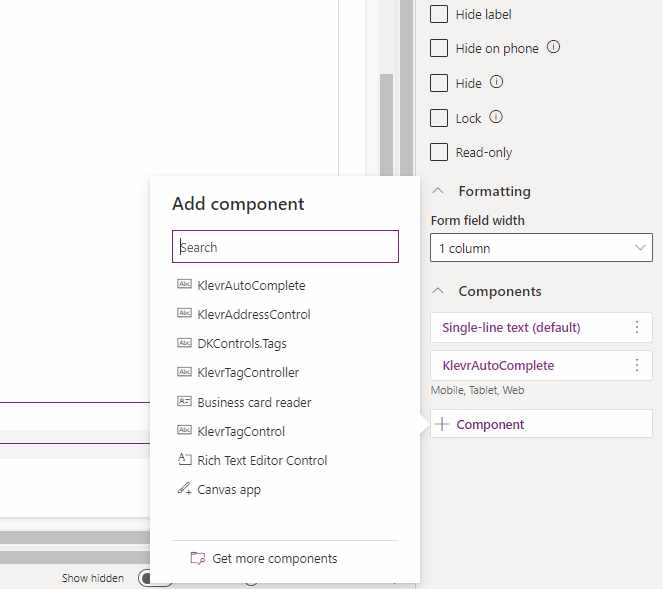
If the control does not come up in the menu above, click the "Get more components" and a new menu should come up allowing you to search for the "KlevrAutoComplete" control.
Next you will have to configure the properties. The Entity Logical Name is the entity that you are looking at to fetch the auto complete values. In the case below I have the Account table set. The FetchXML property is used to fetch the details of the table. For an example:
<fetch>
  <entity name="account">
    <attribute name="name" />
  </entity>
</fetch>
This will fetch the Account tables "name" attribute and use that as the Options in the autocomplete. The Enfoce User Selection property allows you to enforce the user to select an option from the autocomplete. The New Look property allows you to pick between the New Dynamics look or the old Dynamics look, selecting each option will match the looks of the control to which ever
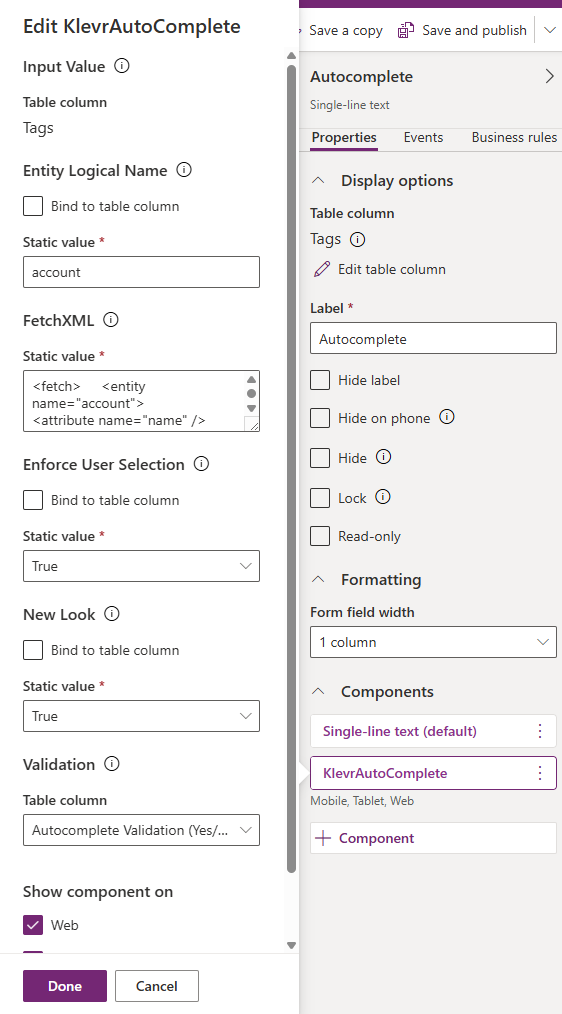
Once finished configuring the properties, click the "Done" button and then save and publish the form and you are all set!
Last updated on