
How To: Capture Images from the Camera as Blob Attachments
This guide describe how to Allow a user to capture attachments directly from a device's camera.
This guide describe how to Allow a user to capture attachments directly from a device's camera. Note that this does not work on PC, but works on Android (tested) and probably Apple (not tested).
Purpose
A user wants to upload photo's in the portal directly from the device camera.
Detailed Instructions
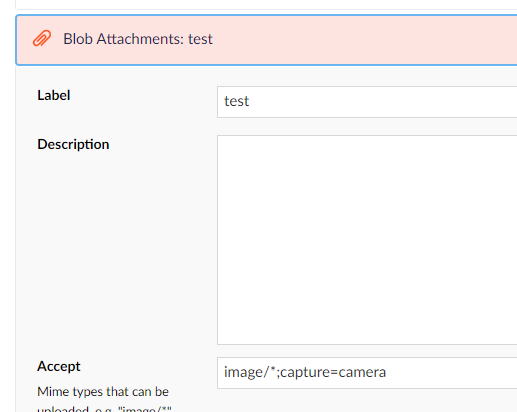
All you need to do is set the "Accept" mime type for the Azure Attachment control to: image/*;capture=camera
e.g:
⏩ Next Steps
This feature has not been extensively tested, but is the intended way to trigger a device to use a camera when uploading a file. Please prototype and ensure it works as intended in your implementation.
💡 See Also
Last updated on