
Slugs on a Dynamics Form Page
This article describes how you can inject dynamic values into your page title and body on a dynamics form based form.
Feature Overview
This article describes how you can inject dynamic values into your page title and body on a dynamics form based form.
Assumptions
You have the latest version of the portal.
Dependencies
None.
Design Details
The form uses Vue to render the controls and display the data dynamically already. We have extended the Vue processing of the page to include the Page title and page body / description so that you can use Vue expressions in the title and body.
Usage
In order to render dynamic data in the tile or body, simply use the Vue Expression syntax: {{ }}
Inside the curly braces you can place any javascript and access any field on the form by its schema name, for example:
{{ klevr_name }} will render the name of the record
{{ klevr_name + "s" }} will render the name with an "s" appended to the end.
{{ klevr_isapproved ? "Record is Approved" : "Record is not approved" }} will render one of the two strings depending on whether klevr_isapproved is true or false.
{{ myCustomFunction() }} will render the return value of a custom function you have defined.
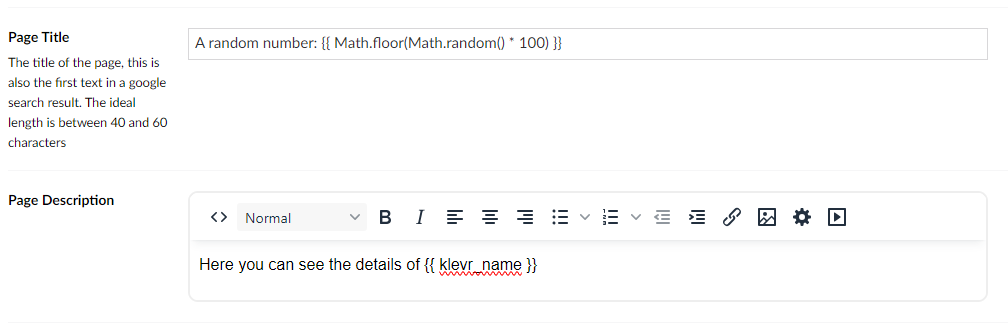
Simply add these "slugs" in the Page title and Page Description sections on the form:
The result:
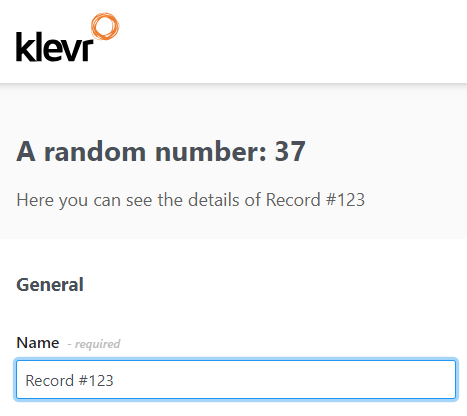
As an additional bonus, the value will dynamically update if the user changes the name of the record too.
Security Considerations
Only data that is included on the form or accessible from Javascript can be used.
🚫 Out of Scope
- Data from related entities
Last updated on